TradingView Bayesian Trend Indicator [ChartPrime] Conversion to NinjaTrader 8
Most trend indicators give you a binary answer: up or down, with maybe a third ‘neutral’ state. That’s useful — but it throws away the most actionable piece of information, which is how confident the indicator is in that call. ChartPrime’s Bayesian Trend Indicator reframes the question as a probability: given the last N bars of fast-MA-vs-slow-MA spread, what’s the posterior probability that we’re currently in an uptrend?
The output is a number between 0 and 1 that drives gradient bar coloring (blue at 1.0, red at 0.0, with a smooth fade through the midpoint), per-bar percentage labels, and a corner-anchored SharpDX HUD that reports the current probability, slope, and regime. It reads more like a model output than a traditional indicator — because it is.
This post is the NinjaTrader 8 conversion. The full source compiles standalone in indTradingView/, exposes the posterior probability as a Series<double> for strategy use, and is yours to download as a NinjaScript Archive.
Original Pine Script: Bayesian Trend Indicator by ChartPrime
License: Mozilla Public License 2.0 (MPL 2.0)
🆚 What Makes the Bayesian Trend Different
Traditional MA-cross indicators commit to a regime change the moment fast crosses slow. Bayes doesn’t commit — it updates a belief. Each new bar feeds the prior probability through a likelihood function (computed from the current MA spread), producing a posterior that smoothly tracks the strength of the trend rather than its presence or absence.
Gradient bar coloring. Instead of a solid green or red bar, each candle is tinted by interpolating between the up-trend color and down-trend color in proportion to the current posterior. A 95% bullish reading paints a saturated up-trend candle; a 55% reading paints a much fainter one. The gradient encodes confidence directly into the chart.
Per-bar percentage labels and HUD. Every bar can carry its own integer-percent label (e.g., ‘P=87%’) showing the live posterior, with configurable size and tick offset. A SharpDX HUD anchored to one of the four chart corners shows the current probability, slope, and regime classification — so you can read the model state without staring at a sub-panel.
⚙️ Settings
Bayesian Trend exposes its parameters in four property groups: the calculation inputs that drive the posterior math, the labels group for per-bar probability text, the table group for the SharpDX HUD configuration, and the display colors that interpolate the gradient bar tint.
Indicator Setup
| Parameter | Default | Description |
|---|---|---|
| Source | Close | Price source feeding the fast and slow moving averages. |
| MA's Length | 50 | Period for the slow moving average (the fast MA is offset by Gap Length). |
| Gap Length Between Fast And Slow MA's | 20 | Bar offset between fast and slow MA — drives the spread that becomes the likelihood input. |
| Gap Signals | 0.30 | Threshold on the posterior delta that fires regime-change marker dots. |
Labels
| Parameter | Default | Description |
|---|---|---|
| Show Probability Labels | True | Render an integer-percent label above or below each bar. |
| Font Size | 12 | Font size of the per-bar probability labels. |
| Tick Offset | 8 | Offset (in TickSize units) above the high or below the low where each label is positioned. |
Table
| Parameter | Default | Description |
|---|---|---|
| Show HUD Table | True | Render the SharpDX corner-anchored HUD with probability, slope, and regime. |
| Position | TopRight | Corner placement for the HUD (TopLeft / TopRight / BottomLeft / BottomRight). |
| Title Font Size | 18 | Font size of the HUD title row. |
| Value Font Size | 22 | Font size of the live probability value in the HUD. |
| Header Font Size | 14 | Font size of the column-header row. |
| Body Font Size | 16 | Font size of the body rows. |
| Background Opacity | 70 | Opacity (0–100) of the HUD background panel. Set to 0 to hide the backdrop. |
🧠 How It Works
Each bar updates the running posterior probability that the trend is up, then paints the bar and HUD accordingly.
- Fast and slow MAs. Compute SMAs of the source on two windows — slow at
MA's Length, fast at(MA's Length − Gap Length). The signed spread between them is the raw signal that drives the likelihood. - Likelihood computation. Map the MA spread through a logistic function so it becomes a probability in [0, 1]. Large positive spread → likelihood near 1; large negative → near 0; near-zero spread → 0.5.
- Bayesian update. Combine the prior (last bar’s posterior) with the new likelihood to produce the current bar’s posterior probability of an up-trend. The posterior smooths abrupt likelihood changes — it doesn’t jump from 0.2 to 0.9 in one bar even if the spread reverses.
- Gradient bar tint. Interpolate the bar’s brush between Down Trend Color and Up Trend Color in proportion to the posterior. A posterior of 0.8 paints the bar 80% of the way toward the up-trend color.
BarBrushes[0]andCandleOutlineBrushes[0]get the same blended color. - Per-bar label. Format the posterior as an integer percent and render via SharpDX above the high (when bullish) or below the low (when bearish), at a configurable tick offset.
- HUD render. Compose a small panel with rows for current probability, slope (delta vs prior bar), and regime classification. Render in OnRender at the configured corner of the chart panel.
The indicator is non-repainting: every posterior is computed on the closed bar’s data and never updates after the bar confirms.
🛠️ Using It in a Strategy
Bayesian Trend exposes its posterior probability as a single Series<double> output. The most natural strategy use is to gate entries by a probability threshold: enter long when the posterior crosses above 0.7, short when it crosses below 0.3, and stay flat in the 0.3–0.7 noise zone.
Below is the lifecycle: instantiate the indicator in State.DataLoaded, then in OnBarUpdate read the posterior and act on threshold crosses.
private BayesianTrend bayes;

protected override void OnStateChange()
{
    if (State == State.SetDefaults)
    {
        Name = "BayesianTrendStrategyExample";
    }
    else if (State == State.DataLoaded)
    {
        bayes = BayesianTrend(
            Close,                                     // Source
            50,                                        // MA's Length
            20,                                        // Gap Length
            0.30,                                      // Gap Signals
            true,                                      // Show HUD Table
            true,                                      // Show Probability Labels
            BayesianTrend_TablePosition.TopRight,      // Position
            18,                                        // Title Font Size
            22,                                        // Value Font Size
            14,                                        // Header Font Size
            16,                                        // Body Font Size
            70,                                        // Background Opacity
            12,                                        // Label Font Size
            8                                          // Label Tick Offset
        );
    }
}

protected override void OnBarUpdate()
{
    if (CurrentBar < 51) return;

    double prob     = bayes.PosteriorUp[0];
    double probPrev = bayes.PosteriorUp[1];

    // Threshold cross from neutral into bullish
    if (prob > 0.70 && probPrev <= 0.70)
        EnterLong();

    // Threshold cross from neutral into bearish
    if (prob < 0.30 && probPrev >= 0.30)
        EnterShort();

    // Exit when posterior decays back through the midline
    if (Position.MarketPosition == MarketPosition.Long && prob < 0.50)
        ExitLong();
    if (Position.MarketPosition == MarketPosition.Short && prob > 0.50)
        ExitShort();
}
PosteriorUp is a Series<double>, so you can index back in time freely — bayes.PosteriorUp[5] reads the posterior five bars ago. The Update() wrapper inside the getter handles sync.
Public Outputs
| Output | Type | Description |
|---|---|---|
| PosteriorUp[0] |
Series | Live posterior probability that the current bar sits in an up-trend, in [0, 1]. 1.0 = certain up, 0.0 = certain down, 0.5 = neutral. |
🔄 Conversion Notes
A few things changed in the translation from Pine Script to NinjaScript:
Gradient bar tint via BarBrushes + CandleOutlineBrushes. Pine’s barcolor() with a gradient fill is reproduced by computing a blended SolidColorBrush per bar and assigning it to both BarBrushes[0] and CandleOutlineBrushes[0]. The interpolation runs in ARGB space across the user’s Up Trend Color and Down Trend Color brushes.
Per-bar SharpDX labels. Pine’s label.new for the per-bar probability is replaced with SharpDX text rendering in OnRender. The label position uses the bar’s high/low plus a configurable tick offset, and the integer-percent format is computed in InvariantCulture to avoid locale-dependent decimals.
SharpDX HUD with configurable typography. The corner-anchored stats panel is fully rendered via SharpDX with four independent font sizes (title, value, header, body), explicit colors for text and muted-headers, and an opacity setting on the background panel that lets users dial it from solid backdrop to fully transparent.
Series-based public output. The posterior is exposed as a Series<double> via PosteriorUp — strategies can index back in time and the Update() wrapper inside the getter ensures sync.
📦 Download
The full source is available as a free NinjaScript Archive. To install:
- Download the
.zipfile below. - In NinjaTrader 8, go to Tools → Import → NinjaScript Add-On.
- Select the downloaded
.zipfile. - The indicator will appear under Indicators → indTradingView → Bayesian Trend Indicator [ChartPrime] on your chart.
📊 Chart Example
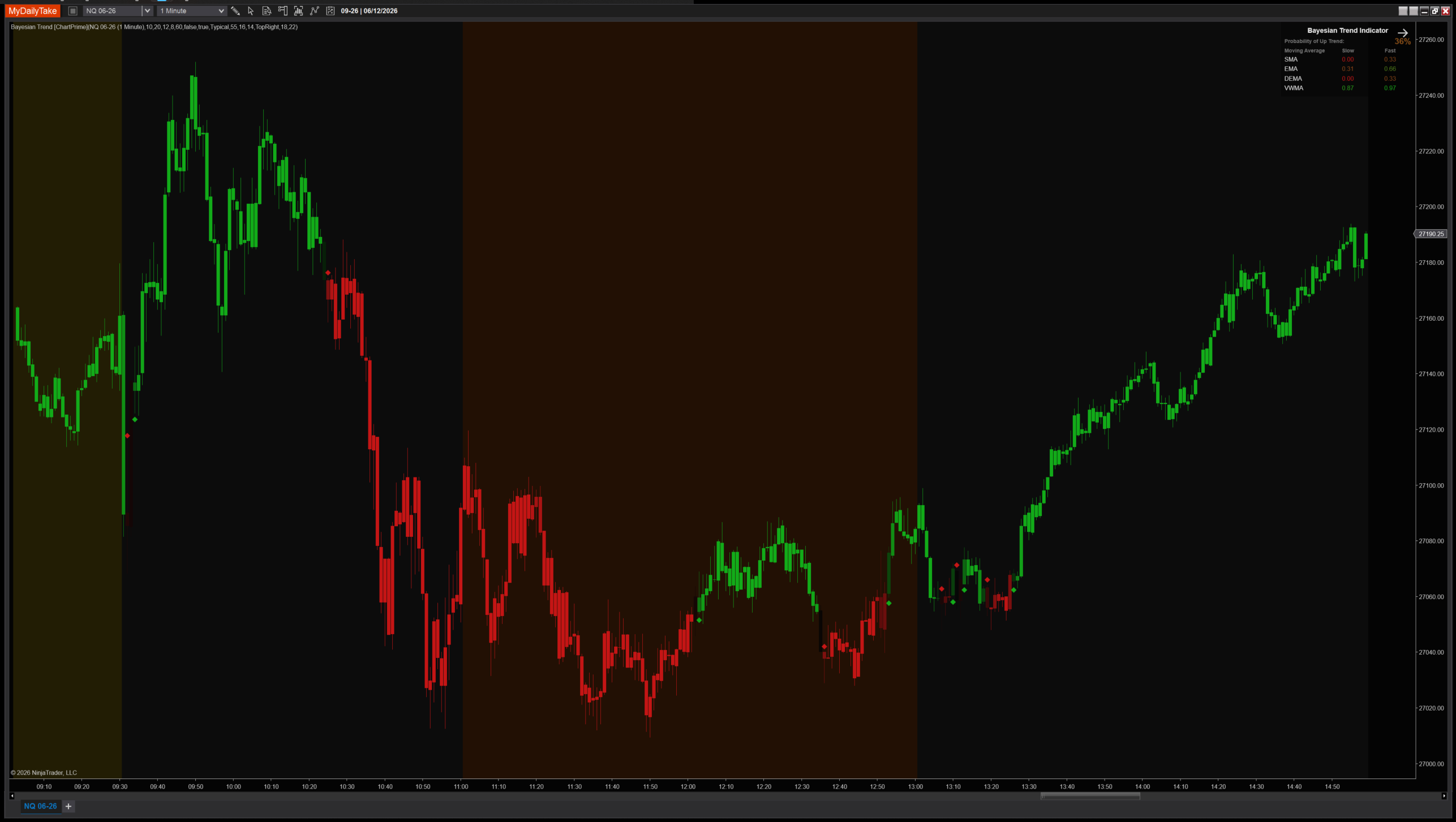
Bayesian Trend Indicator on a 1-minute chart with default settings. Bars are tinted by the live posterior probability — the deeper blue the bar, the higher the model’s confidence in an up-trend. The corner HUD shows the current numerical probability, slope, and regime classification. Notice how the gradient tracks the strength of moves rather than just their direction — early bars in a new trend show muted color, then saturate as the posterior converges.


The original Pine Script™ code is by ChartPrime and is licensed under the Mozilla Public License 2.0 (MPL 2.0). This NinjaTrader 8 adaptation is by MyDailyTake.com. The use of ChartPrime’s name or adapted code does not imply endorsement by the original author.