Learn NinjaScript: Calculating Consecutive Bars Up/Down
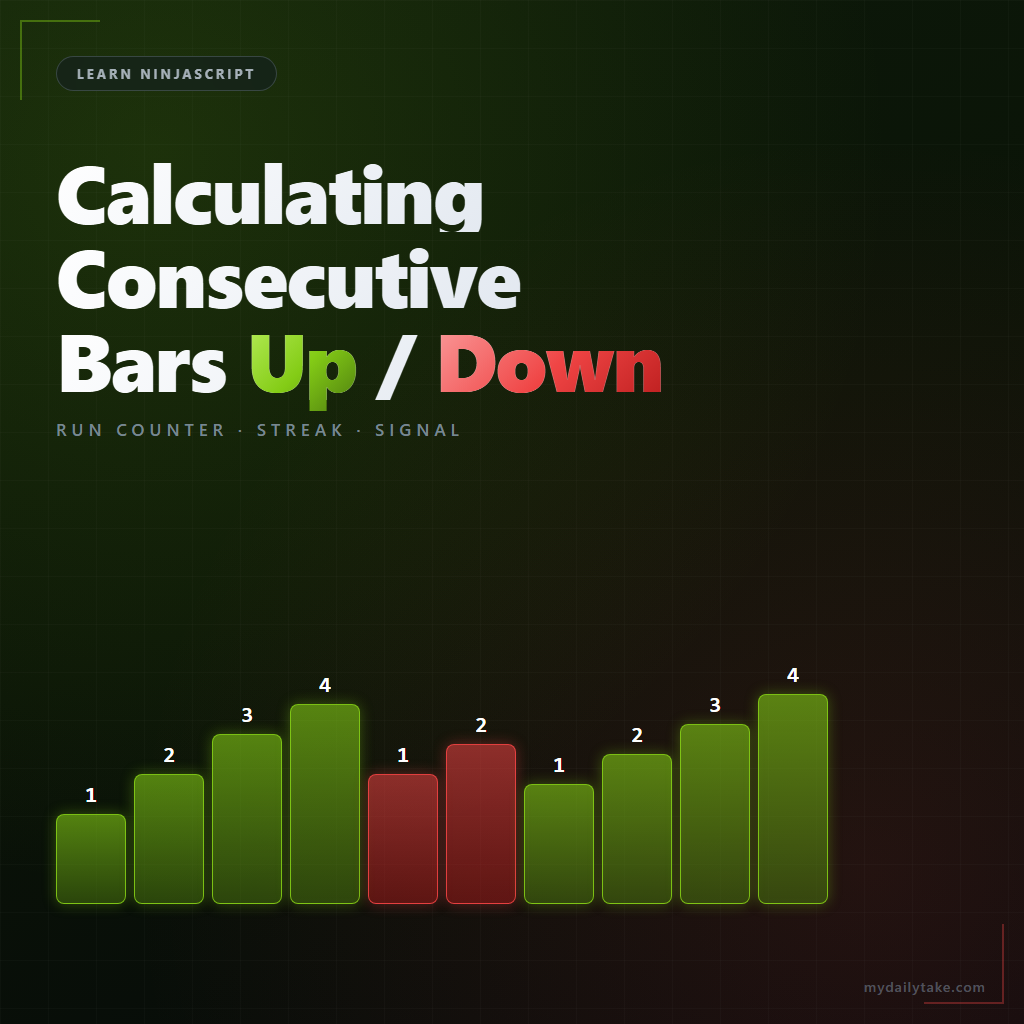
“Three consecutive higher closes.” “Five bars without a lower low.” Pattern rules like these depend on a run counter — a small int that tracks how many bars in a row share a direction. The logic looks trivial but the corner cases are real: what counts as up, what to do with doji bars, how the first bar and gaps are handled.
This post covers the counter pattern, the direction-definition choices you make once and then commit to, and how to expose the running count as a strategy-consumable output.
⚙️ Defining “Up” and “Down” Bars
Before you count, pick a definition. Three common ones:
- Close-to-close. Up bar is
Close[0] > Close[1]. Simplest and most common. Measures momentum between bar closes. - Body direction. Up bar is
Close[0] > Open[0]. Measures the current bar’s own body, regardless of where the previous bar closed. - Range direction. Up bar is
High[0] > High[1] && Low[0] > Low[1]— a full higher-high higher-low bar. Stricter and more meaningful as a trend signal, but rarer.
Pick one, document it in the property description, and be consistent across the indicator. Switching mid-file is a subtle way to produce counters that don’t match what traders think they’re counting.
🔁 The Counter Pattern
Two integer fields: upRun and downRun. On each bar, look at direction. Same direction as previous run: increment. Opposite direction: reset that side and start the other.
private int upRun;
private int downRun;

protected override void OnBarUpdate()
{
    if (CurrentBar < 1) return;

    if (Close[0] > Close[1])
    {
        upRun++;
        downRun = 0;
    }
    else if (Close[0] < Close[1])
    {
        downRun++;
        upRun = 0;
    }
    // else: doji bar — see the next section
}
Increment one side, reset the other. When the direction flips, the incrementing side starts from 1 on the new-direction bar (which is usually what you want — that bar is bar 1 of the new run).
🎯 Doji and Gap Handling
What happens on a bar where Close[0] == Close[1]? Three options, none of them wrong, but you need to pick:
- Reset both counters. Doji breaks the run. Strict, maybe too strict — three up closes, then a doji, then two more up closes reads as “longest run was 2” instead of “5 with a pause.”
- Hold both counters. Doji neither advances nor resets. Three up, doji, two up reads as “5” — the run survived the pause.
- Count as prior direction. If the last direction was up, the doji counts as up. Rare choice, but simplest if you really want the counter to never pause.
The “hold” option is what the snippet above implements implicitly — neither branch executes when Close[0] == Close[1]. Gaps work the same way — a gap-up bar that closes below its own open is still close-above-close, so close-to-close counting doesn’t need special gap logic.
📏 Exposing the Count as a Series
For strategies that want “consecutive up run at bar N in the past,” expose the counter as a Series<int>. The increment/reset logic writes to the Series instead of scalar fields:
private Series<int> sUpRun;
private Series<int> sDownRun;

protected override void OnStateChange()
{
    // ... SetDefaults ...
    if (State == State.DataLoaded)
    {
        sUpRun   = new Series<int>(this, MaximumBarsLookBack.Infinite);
        sDownRun = new Series<int>(this, MaximumBarsLookBack.Infinite);
    }
}

protected override void OnBarUpdate()
{
    if (CurrentBar < 1)
    {
        sUpRun[0] = 0; sDownRun[0] = 0;
        return;
    }

    if (Close[0] > Close[1])
    {
        sUpRun[0]   = sUpRun[1] + 1;
        sDownRun[0] = 0;
    }
    else if (Close[0] < Close[1])
    {
        sUpRun[0]   = 0;
        sDownRun[0] = sDownRun[1] + 1;
    }
    else
    {
        // Hold: carry forward previous bar's values.
        sUpRun[0]   = sUpRun[1];
        sDownRun[0] = sDownRun[1];
    }
}

[Browsable(false)][XmlIgnore]
public Series<int> UpRun   { get { Update(); return sUpRun;   } }
[Browsable(false)][XmlIgnore]
public Series<int> DownRun { get { Update(); return sDownRun; } }
A strategy reading myInd.UpRun[0] >= 3 gets “three consecutive up closes through the current bar.” myInd.UpRun[5] reads the count as it stood five bars ago.
🎯 Using the Count as a Signal Input
The counter is an input to other logic, not a standalone signal. Common uses:
- Confirmation filter: “only take the entry if the up run is at least 3.”
- Exhaustion signal: “if up run hits 7, consider a mean-reversion short.”
- Visualization: plot the run as a sub-panel histogram colored by direction, so the reader can see streaks at a glance.
📝 Pitfalls Checklist
- Mixing body direction with close-to-close halfway through the code. Pick one definition; use it everywhere. Inconsistency is invisible in the counter values but produces signals that don’t match intuition.
- Doji resetting runs when you wanted to hold. If the counter reads “2” where you expected “5” at a price that drifted flat for a bar, doji handling is the cause.
- Not guarding
CurrentBar >= 1.Close[1]on bar 0 throws. - First-bar-after-gap handling. A gap doesn’t affect close-to-close counters, but range-direction counters can behave oddly on gap bars — the new range may bracket the previous range entirely, which doesn’t fit the HH/HL definition.
- Reset timing — does the opposite-direction bar count as 1 in the new direction, or as 0 and the next bar is 1? The snippet above treats the opposite bar as 1. If you want “0 on reset, 1 on next bar same direction,” flip the logic.
- Scalar only. If strategies want the historical run count (e.g., for optimization sweeps), use
Series<int>outputs.


![Cosine Kernel Regressions [QuantraSystems] Conversion](https://mydailytake.com/wp-content/uploads/2024/06/CosineKernelRegressions_5-Minute_NQ-768x458.png)