
TradingView Lumina Trend Channels & Bands [Pineify] Conversion to NinjaTrader 8
Pineify’s Lumina Trend Channels & Bands is a clean VWMA-based trend channel: VWMA(MaLength) for the center, ATR(AtrLength) × Multiplier for the band width, with sticky direction flips when close crosses the active band. The visual pairs with SharpDX trapezoid cloud fills between the center and the bands — bull-tinted in an uptrend, bear in a down — and BarBrushes that recolor the candles by direction.
Default settings (MaLength = 50, AtrLength = 14, BandMultiplier = 2.0) produce a stable swing-style channel that holds direction through small wicks and only flips on committed closes. The trend state is exposed for strategy use, plus event-based bull / bear breakout flags.
This post is the NinjaTrader 8 conversion. The full source compiles standalone in indTradingView/, exposes the bands + the trend state + the breakout flags as Series<> outputs for strategy use, and is yours to download as a NinjaScript Archive.
Original Pine Script: Lumina Trend Channels & Bands by Pineify
License: Mozilla Public License 2.0 (MPL 2.0)
🆚 What Makes Lumina Trend Channels Different
Standard MA + ATR-band indicators (Keltner, Donchian variants) flip on every band cross. Useful, but in chop the channel whipsaws constantly. Lumina’s contribution is sticky direction state — once the channel is up, it stays up until close commits below the lower band; once down, stays down until close commits above the upper band. Single-bar wick excursions are ignored.
VWMA center, not SMA. Volume-weighted moving average gives more weight to high-volume bars, so the channel center reflects participation, not just price. In quiet zones the center barely moves; in high-volume bars it adjusts faster.
SharpDX cloud fills with active / faint variants. Two pre-built brushes per direction — active (saturated) and faint (translucent). The active brush fills between the center and the active-side band; the faint brush fills the inactive side. So the chart shows you which side of the channel price is committed to.
Bar coloring via BarBrushes. Candles recolor in the trend tone (bull / bear). The chart itself reads the regime — no panel-glance needed.
⚙️ Settings
Lumina Trend Channels exposes its inputs in two property groups: the calculation parameters (VWMA length, ATR length, band multiplier) and the bull / bear colors.
Settings
| Parameter | Default | Description |
|---|---|---|
| MA Length | 50 | VWMA length for the center line. |
| ATR Length | 14 | ATR period used to size the bands. |
| Band Multiplier | 2.0 | ATR multiplier — bands sit at center ± ATR × this. |
Display
| Parameter | Default | Description |
|---|---|---|
| Bullish Color | #089981 | Bull cloud fill, bull-trend bar coloring, lower band tint in an uptrend. |
| Bearish Color | #F23645 | Bear cloud fill, bear-trend bar coloring, upper band tint in a downtrend. |
🧠 How It Works
Each bar runs the VWMA + ATR pair, computes the bands, and tests for direction flips.
- VWMA center. VWMA(close, MaLength) is the volume-weighted center. High-volume bars dominate; low-volume bars contribute proportionally less.
- ATR-derived bands. UpperBand = BaseMa + ATR(AtrLength) × BandMultiplier. LowerBand = BaseMa − ATR × BandMultiplier. Default 2 ATR width.
- Sticky direction. Currently up: flip down only when close < LowerBand. Currently down: flip up only when close > UpperBand. Single-bar wicks against the active band don’t flip the state.
- Breakout flags. BullBreakout[0] = true on the bar IsUptrend transitioned from false to true. BearBreakout symmetric.
- SharpDX cloud fills. Active brush fills between BaseMa and the active-side band; faint brush fills the inactive side. Two brushes per direction, built once per render-target lifecycle.
- Bar coloring. BarBrushes[0] + CandleOutlineBrushes[0] set to the trend tone — bull or bear — based on IsUptrend.
The indicator is non-repainting — VWMA and ATR are closed-bar; direction flips use closed-bar close.
🛠️ Using It in a Strategy
Lumina Trend Channels is a clean trend-following entry source. The most natural strategy use is to enter on BullBreakout / BearBreakout and trail along the BaseMa or LowerBand / UpperBand. The example below uses a flip-and-trail pattern.
Below is the lifecycle: instantiate in State.DataLoaded, then in OnBarUpdate watch for breakout flags.
private LuminaTrendChannels ltc;

protected override void OnStateChange()
{
    if (State == State.SetDefaults)
    {
        Name = "LuminaTrendChannelsStrategyExample";
    }
    else if (State == State.DataLoaded)
    {
        ltc = LuminaTrendChannels(
            50,    // MA Length
            14,    // ATR Length
            2.0    // Band Multiplier
        );
    }
}

protected override void OnBarUpdate()
{
    if (CurrentBar < 60) return;

    if (ltc.BullBreakout[0] && Position.MarketPosition != MarketPosition.Long)
    {
        EnterLong();
        SetStopLoss(CalculationMode.Price, ltc.LowerBand[0]);
    }
    if (ltc.BearBreakout[0] && Position.MarketPosition != MarketPosition.Short)
    {
        EnterShort();
        SetStopLoss(CalculationMode.Price, ltc.UpperBand[0]);
    }

    // Trail along the opposite band as the regime continues
    if (Position.MarketPosition == MarketPosition.Long)
        SetStopLoss(CalculationMode.Price, ltc.LowerBand[0]);
    else if (Position.MarketPosition == MarketPosition.Short)
        SetStopLoss(CalculationMode.Price, ltc.UpperBand[0]);
}
Six Series<> outputs cover both the continuous values (bands, midline) and the event-based flags. The IsUptrend boolean is the persistent regime read.
Public Outputs
| Output | Type | Description |
|---|---|---|
| BaseMa[0] |
Series | VWMA center line. |
| UpperBand[0] |
Series | Upper band level — VWMA + ATR × Multiplier. |
| LowerBand[0] |
Series | Lower band level — VWMA − ATR × Multiplier. |
| IsUptrend[0] |
Series | True in an uptrend, false in a downtrend. |
| BullBreakout[0] |
Series | True on the bar a bullish band-cross flip is committed. |
| BearBreakout[0] |
Series | True on the bar a bearish flip is committed. |
🔄 Conversion Notes
A few things changed in the translation from Pine Script to NinjaScript:
VWMA + ATR via NT8 primitives. NT8’s VWMA(Close, MaLength) and ATR(AtrLength) primitives match Pine’s ta.vwma and ta.atr exactly. No inline implementation needed.
Sticky direction state. A persistent boolean field (direction) updated on close-vs-band crosses. Until close commits, the state holds — same Pine var semantics.
SharpDX trapezoid cloud fills. Pine’s fill() between the center and the bands becomes per-bar SharpDX trapezoids in OnRender. Two brushes per direction — active (saturated) and faint (translucent) — pre-built in OnRenderTargetChanged.
BarBrushes for candle coloring. Pine’s barcolor() by direction maps to per-bar BarBrushes[0] + CandleOutlineBrushes[0] assignments.
Series-based public outputs. Six outputs cover the bands, the midline, the trend state, and the breakout events — strategies can pick the level of detail they need.
📦 Download
The full source is available as a free NinjaScript Archive. To install:
- Download the
.zipfile below. - In NinjaTrader 8, go to Tools → Import → NinjaScript Add-On.
- Select the downloaded
.zipfile. - The indicator will appear under Indicators → indTradingView → Lumina Trend Channels & Bands [Pineify] on your chart.
📊 Chart Example
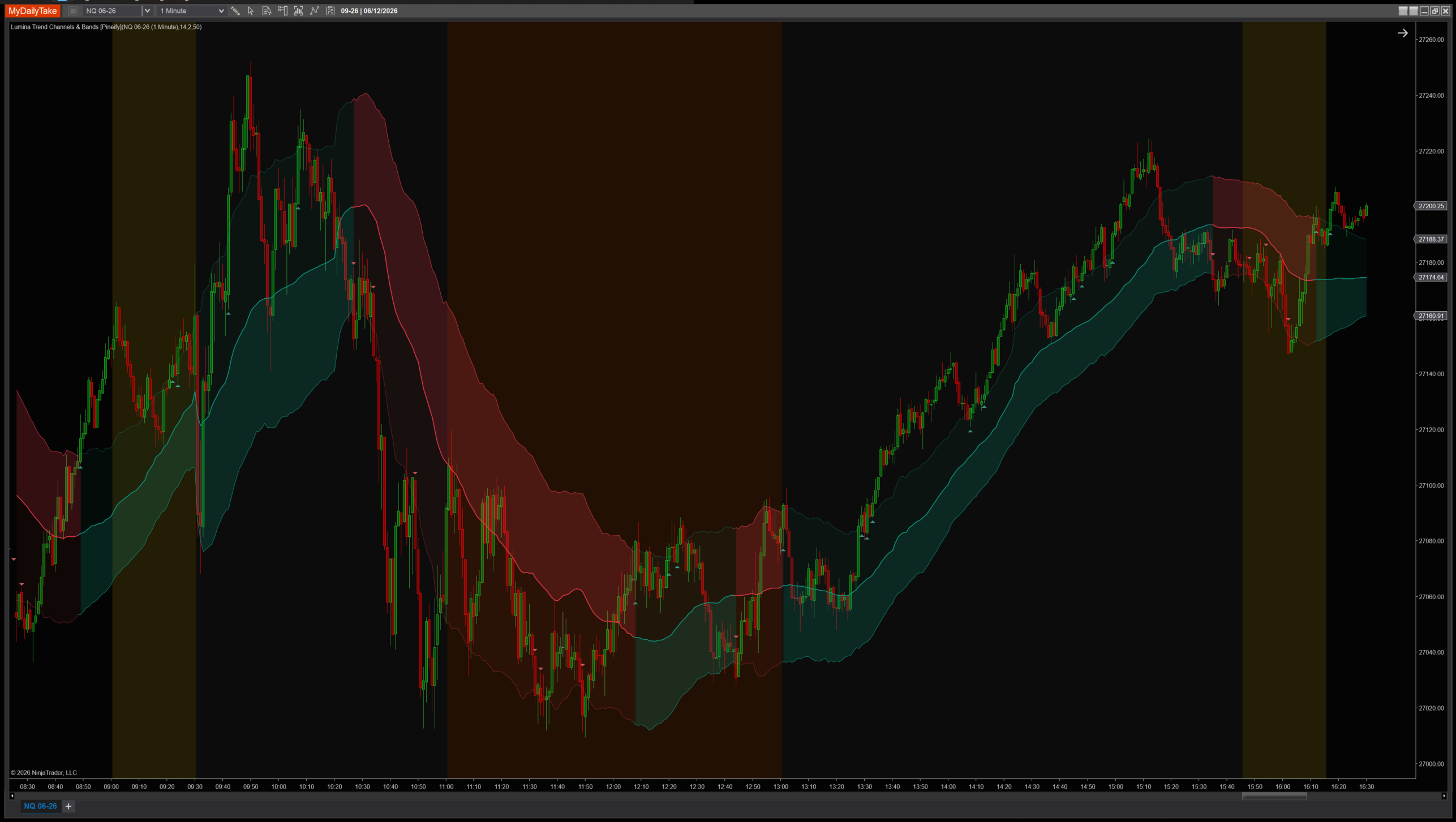
Lumina Trend Channels & Bands on a 1-minute chart with default settings (VWMA=50, ATR=14×2). Center line in blue, upper / lower bands in green / red. SharpDX cloud fills tint the active side of the channel in the trend tone. Bars recolor by direction; breakout flags fire on committed band crosses.


The original Pine Script™ code is by Pineify and is licensed under the Mozilla Public License 2.0 (MPL 2.0). This NinjaTrader 8 adaptation is by MyDailyTake.com. The use of Pineify’s name or adapted code does not imply endorsement by the original author.
