
TradingView Nadaraya-Watson: Rational Quadratic Kernel (Non-Repainting) [jdehorty] Conversion to NinjaTrader 8
jdehorty’s Nadaraya-Watson Rational Quadratic Kernel is the minimal form of his kernel-regression family — a single Rational-Quadratic kernel line over close, no envelope, no extras. Just the smooth, non-repainting trend filter that earned the family its reputation.
Two color modes: rate-of-change (slope-based bull / bear) or yhat2 / yhat1 crossover (where yhat2 is the same kernel at Lookback − Lag, so a faster line). The crossover mode lights up before slope mode does, at the cost of slightly less smoothing.
This post is the NinjaTrader 8 conversion. The full source compiles standalone in indTradingView/, exposes the kernel line + the lagged kernel line + an alert-stream series as Series<double> outputs for strategy use, and is yours to download as a NinjaScript Archive.
Original Pine Script: Nadaraya-Watson: Rational Quadratic Kernel by jdehorty
License: Mozilla Public License 2.0 (MPL 2.0)
🆚 What Makes the RQ Kernel Different
Standard kernel regression repaints — the kernel weights span back arbitrarily far, and as new bars arrive the weighted history shifts. jdehorty’s contribution was producing a non-repainting form: pre-compute the kernel weights once over a fixed window, then read the current and historical bars through that fixed window. Once a bar’s kernel close is computed, it’s final.
Single line, two color modes. The ‘simpler cousin’ to the full Nadaraya-Watson Envelope. No bands, no envelope — just the smooth kernel line, with two coloring schemes. Slope-mode is the slower, surer signal; smooth-cross-mode (yhat2 > yhat1) lights up earlier.
Rational-Quadratic kernel. w_i = (1 + (i² / (Alpha × Lookback²)))^(−Alpha). Recent bars get the highest weight; older bars decay quickly but not as steeply as Gaussian. A balanced choice for financial data.
Pre-computed weights. The kernel width is capped at the same 12 × Lookback rule the envelope version uses. Weights are computed once in State.DataLoaded — per-bar cost is just the weighted sum, not the kernel reconstruction.
⚙️ Settings
RQ Kernel exposes its inputs in two property groups: the calculation parameters (kernel + start bar + color mode + lag) and the bullish / bearish colors.
Kernel
| Parameter | Default | Description |
|---|---|---|
| Lookback | 8.0 | Width of the Rational-Quadratic kernel. |
| Alpha | 8.0 | Smoothing exponent. Higher = faster decay (more weight on recent bars). |
| Start Bar | 25 | Bars before the kernel begins evaluating (warmup skip). |
| Smooth Colors | False | Off = slope-based color (current vs prior). On = yhat2 vs yhat1 crossover (lights up earlier). |
| Lag | 2 | Lookback offset for the comparison kernel (yhat2). Used only when Smooth Colors is on. |
Colors
| Parameter | Default | Description |
|---|---|---|
| Bullish Color | #3AFF17 | Kernel line when bullish. |
| Bearish Color | #FD1707 | Kernel line when bearish. |
🧠 How It Works
Each bar runs the pre-computed RQ kernel weights over close, then evaluates the chosen color mode.
- Kernel weight precomputation. On
State.DataLoaded, compute weights w_i = (1 + (i² / (Alpha × Lookback²)))^(−Alpha) for the main kernel (Lookback) and the lag kernel (Lookback − Lag). Store both indouble[]arrays. - yhat1 — primary kernel. Each bar, yhat1 = sum(w_i × close[i]) / sum(w_i) over the main kernel window. The standard Nadaraya-Watson estimator at the current bar.
- yhat2 — lagged kernel. Same calc with the lag kernel weights. Slightly faster line; same input bars, different weight decay.
- Color flow. Smooth Colors off: bull when yhat1[0] > yhat1[1] (slope rising), bear otherwise. On: bull when yhat2 > yhat1 (faster line above slower line — early bull signal), bear when below.
- Alert stream. +1 on the bar a bull color change committed, −1 on a bear color change, 0 otherwise. Useful for strategies that want event-based signals from the color change.
The indicator is non-repainting — kernel weights are pre-computed once; per-bar yhat values are computed once and never updated.
🛠️ Using It in a Strategy
RQ Kernel’s most natural strategy use is event-driven via the AlertStream: enter on +1, exit / reverse on −1. The example below uses both the alert stream and an alternative midline crossover via the lagged kernel.
Below is the lifecycle: instantiate in State.DataLoaded, then in OnBarUpdate watch for the alert events.
private NadarayaWatsonRqKernel rqk;

protected override void OnStateChange()
{
    if (State == State.SetDefaults)
    {
        Name = "RqKernelStrategyExample";
    }
    else if (State == State.DataLoaded)
    {
        rqk = NadarayaWatsonRqKernel(
            8.0,    // Lookback
            8.0,    // Alpha
            25,     // Start Bar
            false,  // Smooth Colors (use slope-based)
            2       // Lag
        );
    }
}

protected override void OnBarUpdate()
{
    if (CurrentBar < 30) return;

    // AlertStream fires +1 / -1 on color changes
    if (rqk.AlertStream[0] >  0.5 && Position.MarketPosition != MarketPosition.Long)  EnterLong();
    if (rqk.AlertStream[0] < -0.5 && Position.MarketPosition != MarketPosition.Short) EnterShort();

    // Use the kernel line as a trailing reference
    if (Position.MarketPosition == MarketPosition.Long)
        SetStopLoss(CalculationMode.Price, rqk.NwLine[0]);
    else if (Position.MarketPosition == MarketPosition.Short)
        SetStopLoss(CalculationMode.Price, rqk.NwLine[0]);
}
All three outputs are Series<double>. The AlertStream gives event-based fire / reverse signals; the two kernel lines are usable for any custom logic.
Public Outputs
| Output | Type | Description |
|---|---|---|
| NwLine[0] |
Series | Primary kernel regression line (yhat1). |
| NwLineLag[0] |
Series | Comparison kernel at Lookback − Lag (yhat2). |
| AlertStream[0] |
Series | +1 on bull color change, −1 on bear color change, 0 otherwise. |
🔄 Conversion Notes
A few things changed in the translation from Pine Script to NinjaScript:
Pre-computed kernel weights array. Same approach as the Envelope conversion — weights are computed once in State.DataLoaded into a double[]. Two arrays here: one for yhat1 (Lookback) and one for yhat2 (Lookback − Lag).
Color mode via PlotBrushes. Pine’s two color expressions become a per-bar PlotBrushes[0][0] assignment in OnBarUpdate. The Smooth Colors toggle picks the comparison.
Alert stream as a Series<double>. Pine’s alertcondition calls are stripped; the conversion exposes the same event timeline as a Series<double> stream — +1 / −1 / 0 — so strategies can read color-change events directly.
2 alertconditions stripped. Pine’s alertcondition calls are stripped per the conversion convention. Strategy consumers use AlertStream instead — same event timing, programmatic access.
Series-based public outputs. NwLine, NwLineLag, AlertStream — covers the kernel line, the lagged comparison line, and the event stream.
📦 Download
The full source is available as a free NinjaScript Archive. To install:
- Download the
.zipfile below. - In NinjaTrader 8, go to Tools → Import → NinjaScript Add-On.
- Select the downloaded
.zipfile. - The indicator will appear under Indicators → indTradingView → Nadaraya-Watson: Rational Quadratic Kernel [jdehorty] on your chart.
📊 Chart Example
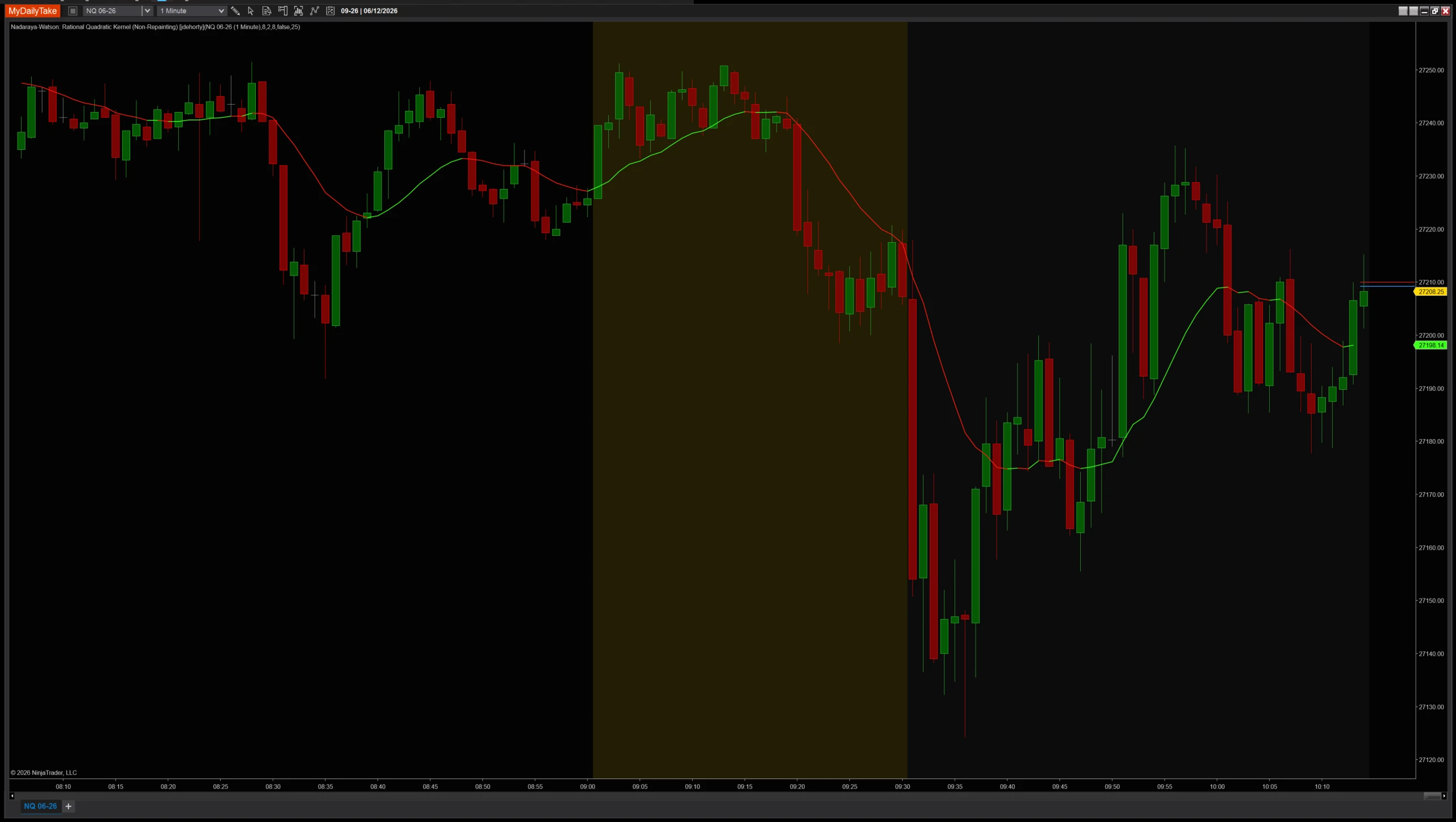
Nadaraya-Watson Rational Quadratic Kernel on a 1-minute chart with default settings (Lookback=8, Alpha=8, Lag=2). The smooth kernel line glides through price, color-coded by slope (or by yhat2 vs yhat1 crossover when Smooth Colors is on). Color changes are picked up as +1 / −1 events in the AlertStream output.


The original Pine Script™ code is by jdehorty and is licensed under the Mozilla Public License 2.0 (MPL 2.0). This NinjaTrader 8 adaptation is by MyDailyTake.com. The use of jdehorty’s name or adapted code does not imply endorsement by the original author.
