

TradingView CM Ultimate MA MTF V4 [ChrisMoody] Conversion to NinjaTrader 8
ChrisMoody’s CM Ultimate MA MTF V4 is the workhorse moving-average overlay — fast / slow MA pair with eight selectable MA types per leg (SMA, EMA, WMA, Hull, VWMA, RMA, TEMA, Tilson T3), independent price sources per leg, and two coloring modes (slope-driven or fast-vs-slow).
Default Fast = SMA(20, Close); Slow = SMA(50, Close), but every parameter is independently configurable. SharpDX trapezoid fill between the two MAs at user-set transparency, and three coloring modes for the Fast line: solid, slope-based (current vs N-bar prior), or fast-vs-slow (Fast above Slow = bull color).
This post is the NinjaTrader 8 conversion. The full source compiles standalone in indTradingView/, exposes the Fast / Slow values plus the ‘is fast above slow’ flag as Series<> outputs for strategy use, and is yours to download as a NinjaScript Archive.
Original Pine Script: CM Ultimate MA MTF V4 by ChrisMoody
License: Mozilla Public License 2.0 (MPL 2.0)
🆚 What Makes CM Ultimate MA MTF Different
Most dual-MA indicators give you SMA and EMA. CM Ultimate’s value is the breadth of MA types per leg — eight options each, including the harder-to-implement Hull, VWMA, TEMA, and Tilson T3. Mix and match: HMA fast + EMA slow, T3 fast + WMA slow, anything you can imagine.
Eight MA types per leg. SMA, EMA, WMA, Hull (HMA), VWMA, RMA (Wilder smoothing), TEMA (triple EMA), Tilson T3 (gd³ chain across 6 EMAs with configurable factor). Each has its own personality — HMA for sharp response, T3 for the smoothest with little lag, RMA for traditional Wilder behavior.
Independent price source per leg. Fast and Slow each pick from Close, Open, High, Low, HL2, HLC3, OHLC4. So you can run an HMA on Close as Fast and an SMA on HL2 as Slow — the standard ‘one indicator with N parameters’ versus ‘two indicators side by side.’
Two color modes. Slope coloring: Fast colored bull when above its N-bar prior value, bear when below. Fast-vs-Slow coloring: Fast colored bull when above Slow, bear when below. Fast-vs-Slow takes precedence if both are enabled. So the Fast line itself reads the regime.
⚙️ Settings
CM Ultimate MA MTF exposes its inputs in three property groups: the Fast MA leg (length, source, type, T3 factor, color, width), the Slow MA leg (same set of properties), and the Plot Settings group (slope/comparison toggles, smoothing length, bull / bear colors, fill toggle and transparency).
Fast MA
| Parameter | Default | Description |
|---|---|---|
| Length | 20 | Fast MA length. |
| Source | Close | Price input for the Fast MA (Close, Open, High, Low, HL2, HLC3, OHLC4). |
| Type | SMA | MA type — SMA, EMA, WMA, HMA, VWMA, RMA, TEMA, T3. |
| T3 Factor | 0.7 | Tilson T3 weighting factor (only used when Type = T3). |
| Width | 3 | Plot stroke width. |
Slow MA
| Parameter | Default | Description |
|---|---|---|
| Show Slow MA | False | Render the Slow MA as a separate plot. |
| Length | 50 | Slow MA length. |
| Source | Close | Price input for the Slow MA. |
| Type | SMA | MA type. |
| T3 Factor | 0.7 | T3 weighting factor. |
| Width | 3 | Plot stroke width. |
Plot Settings
| Parameter | Default | Description |
|---|---|---|
| Color Fast by Slope | False | Fast colored bull when current > N-bar prior, bear otherwise. |
| Slope Smoothing | 2 | N for the slope-color comparison. |
| Bullish Color | Green | Bull tone for slope / fast-vs-slow coloring. |
| Bearish Color | Red | Bear tone. |
| Color Fast vs Slow | False | Fast colored bull when above Slow, bear when below. Takes precedence over slope coloring. |
| Show Fill | True | Render translucent fill between Fast and Slow MAs. |
| Fill Transparency | 50 | 0 = solid, 100 = invisible (Pine semantics). |
🧠 How It Works
Each bar reads the chosen source for each leg, runs the selected MA type, and applies the coloring + fill logic.
- Source selection per leg. The Fast and Slow source enums select from Close, Open, High, Low, HL2, HLC3, OHLC4.
sFastSrc/sSlowSrcare persistentSeries<double>updated each bar from the chosen source. - MA computation per leg. NT8 has built-in
SMA,EMA,WMA,HMA,VWMA,TEMAprimitives wrapping each leg’s source series. RMA and T3 are inlined — RMA as Wilder smoothing α = 1/n, T3 as a chain of six EMAs combined via Tilson’s gd³ formula. - Slope coloring. When Color Fast by Slope is on, compare FastMa[0] to FastMa[FastSlopeSmooth]. Bull tone if rising, bear if falling. Per-bar PlotBrushes assignment.
- Fast-vs-Slow coloring. When on, compare FastMa[0] to SlowMa[0]. Bull tone if Fast ≥ Slow, bear if below. Takes precedence over slope coloring.
- SharpDX fill. When ShowFill is on, per-bar SharpDX trapezoids fill the area between FastMa and SlowMa in the regime tone. Transparency follows Pine semantics — 0 = solid, 100 = invisible.
The indicator is non-repainting — every MA is closed-bar, every coloring decision uses closed-bar values.
🛠️ Using It in a Strategy
CM Ultimate MA MTF is the building-block dual-MA overlay. The most natural strategy use is a fast/slow cross — enter long on FastMa crossing above SlowMa, exit / reverse on the opposite cross. The example below uses the IsFastAboveSlow flag with bar-level cross detection.
Below is the lifecycle: instantiate in State.DataLoaded, then in OnBarUpdate watch for cross transitions.
private CmUltimateMaMtf cmma;

protected override void OnStateChange()
{
    if (State == State.SetDefaults)
    {
        Name = "CmUltimateMaMtfStrategyExample";
    }
    else if (State == State.DataLoaded)
    {
        cmma = CmUltimateMaMtf(
            20,                                       // Fast Length
            CmUltimateMaMtf_Source.Close,             // Fast Source
            CmUltimateMaMtf_MAType.SMA,               // Fast Type
            0.7,                                      // Fast T3 Factor
            3,                                        // Fast Width
            true,                                     // Show Slow MA
            50,                                       // Slow Length
            CmUltimateMaMtf_Source.Close,             // Slow Source
            CmUltimateMaMtf_MAType.SMA,               // Slow Type
            0.7,                                      // Slow T3 Factor
            3,                                        // Slow Width
            false,                                    // Show Fast Slope Color
            2,                                        // Fast Slope Smooth
            true,                                     // Show Fast vs Slow Color
            true,                                     // Show Fill
            50                                        // Fill Transparency
        );
    }
}

protected override void OnBarUpdate()
{
    if (CurrentBar < 60) return;

    bool crossUp   =  cmma.IsFastAboveSlow[0] && !cmma.IsFastAboveSlow[1];
    bool crossDown = !cmma.IsFastAboveSlow[0] &&  cmma.IsFastAboveSlow[1];

    if (crossUp   && Position.MarketPosition != MarketPosition.Long)  EnterLong();
    if (crossDown && Position.MarketPosition != MarketPosition.Short) EnterShort();

    // Trail along the slow MA
    if (Position.MarketPosition == MarketPosition.Long)
        SetStopLoss(CalculationMode.Price, cmma.SlowMa[0]);
    else if (Position.MarketPosition == MarketPosition.Short)
        SetStopLoss(CalculationMode.Price, cmma.SlowMa[0]);
}
cmma.IsFastAboveSlow[0] != cmma.IsFastAboveSlow[1] is the cross-detection idiom. cmma.FastMa / cmma.SlowMa can serve as trailing stop references depending on the trade direction.
Public Outputs
| Output | Type | Description |
|---|---|---|
| FastMa[0] |
Series | Fast MA value. |
| SlowMa[0] |
Series | Slow MA value. |
| IsFastAboveSlow[0] |
Series | True when Fast ≥ Slow on the current bar. |
🔄 Conversion Notes
A few things changed in the translation from Pine Script to NinjaScript:
Eight MA types per leg. Pine uses string-input switches; the conversion uses a typed C# enum (CmUltimateMaMtf_MAType) so the property dialog is a real dropdown. Each type’s primitive is instantiated in State.DataLoaded and selected per bar.
RMA inlined. NT8 has no RMA primitive. The conversion implements Wilder smoothing as a recursive series with α = 1 / length — matches Pine’s ta.rma exactly.
Tilson T3 inlined. Pine’s T3 is a chain of six EMAs combined via the gd³ formula with a configurable factor. The conversion implements the full chain inline as six Series<double> with the standard Tilson recurrence — output matches the Pine plot one-to-one.
Source enum via NT8 source helper. Pine’s input.source string-based selector becomes a typed enum + a per-bar source-write to a backing Series<double> that the MA primitives wrap.
Slope-color precedence. When both Slope Color and Fast-vs-Slow Color are enabled, Fast-vs-Slow wins — this matches Pine’s source-order logic. Per-bar PlotBrushes carries the active brush.
SharpDX trapezoid fill. Pine’s fill() between Fast and Slow becomes per-bar SharpDX trapezoids in OnRender, with FillTransparency-controlled alpha.
Documented scope drops: MTF (request.security) for both legs is omitted — single-timeframe only. The Pine offset parameter is also omitted; same-bar plots only.
📦 Download
The full source is available as a free NinjaScript Archive. To install:
- Download the
.zipfile below. - In NinjaTrader 8, go to Tools → Import → NinjaScript Add-On.
- Select the downloaded
.zipfile. - The indicator will appear under Indicators → indTradingView → CM Ultimate MA MTF V4 [ChrisMoody] on your chart.
📊 Chart Example
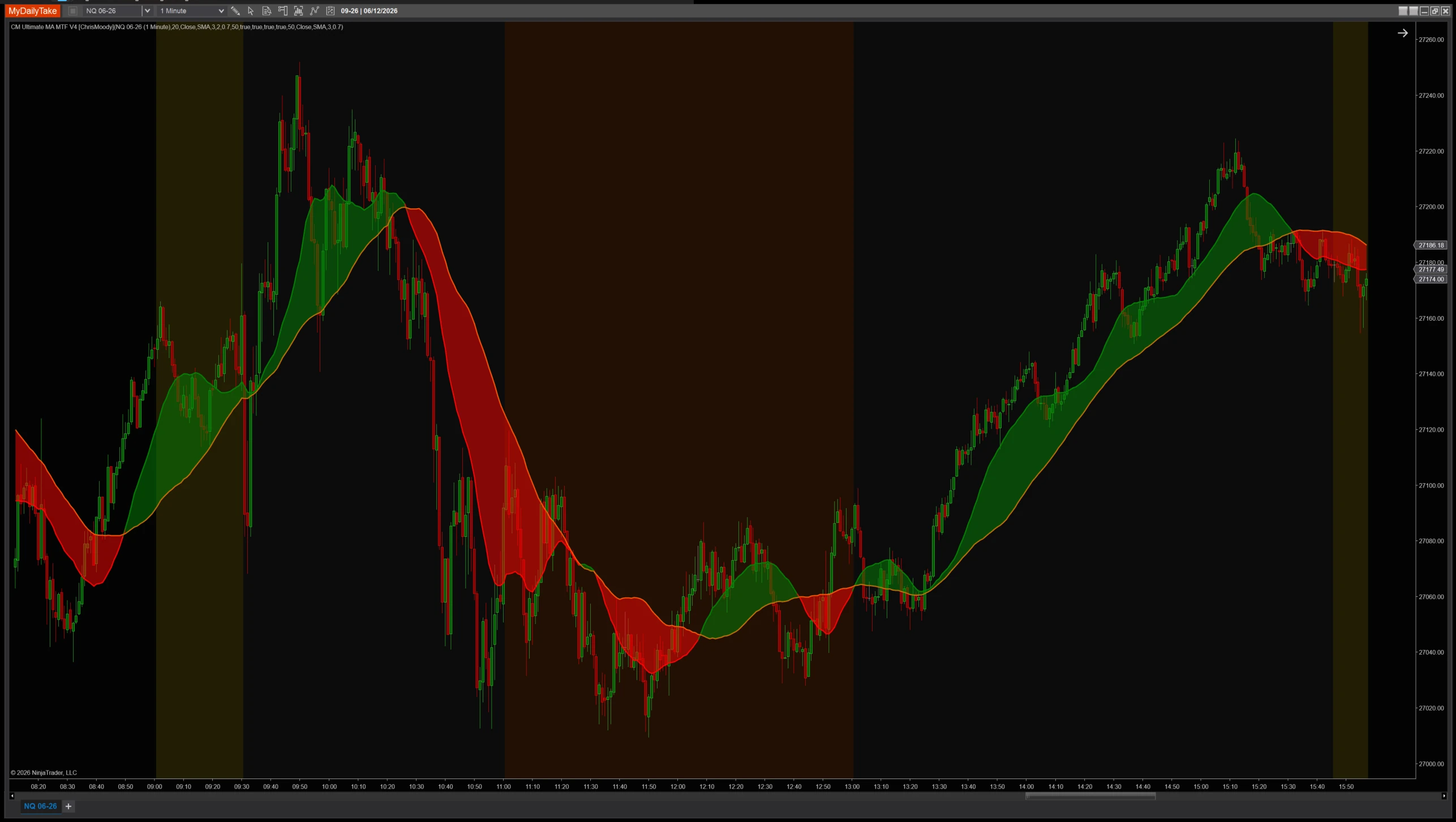
CM Ultimate MA MTF V4 on a 1-minute chart with default settings (Fast SMA-20, Slow SMA-50, both Close). The Fast line in DodgerBlue, the Slow line in Orange. SharpDX fill between them shades the area in regime tone with 50% transparency. Slope and fast-vs-slow coloring options recolor the Fast line directly.


The original Pine Script™ code is by ChrisMoody and is licensed under the Mozilla Public License 2.0 (MPL 2.0). This NinjaTrader 8 adaptation is by MyDailyTake.com. The use of ChrisMoody’s name or adapted code does not imply endorsement by the original author.
