TradingView QQE MOD [Mihkel00] Conversion to NinjaTrader 8
QQE — Quantitative Qualitative Estimation — runs an EMA-smoothed RSI through an ATR-of-RSI band system and produces a trailing trend line that flips on close-cross. Mihkel00’s QQE MOD takes that primitive and runs two of them in parallel, then layers a Bollinger band of the primary QQE’s trend line as a zero-cross filter. The histogram lights up only when both QQEs agree.
Primary QQE drives the long-term trend; secondary QQE provides the histogram drive; the Bollinger band of (primary trend line − 50) acts as the noise filter — bars within the BB envelope are too close to neutral to commit. The result is an oscillator that’s quiet during chop and unmistakable during clean trend moves.
This post is the NinjaTrader 8 conversion. The full source compiles standalone in indTradingView/, exposes the primary / secondary QQE trend lines and underlying RSI values as Series<double> outputs for strategy use, and is yours to download as a NinjaScript Archive.
Original Pine Script: QQE MOD by Mihkel00
License: Mozilla Public License 2.0 (MPL 2.0)
🆚 What Makes QQE MOD Different
Standard QQE has one oscillator and one threshold. Useful, but a single QQE can lag against a smaller / more responsive QQE during fast moves, or whipsaw against a smoother QQE during chop. QQE MOD’s contribution is to run both at once and require agreement.
Two QQEs in parallel. Primary QQE has a longer smoothing window and looser factor (default RSI=6, EMA=5, factor=3.0). Secondary has the same RSI / EMA but a tighter factor (1.61) for sharper response. Each QQE produces its own trend line; both have to agree before the histogram fires.
Bollinger filter on the primary trend line. A 50-bar Bollinger of the (primary trend − 50) acts as a zero-cross noise gate. A trend value close to 50 (price in equilibrium) is inside the BB and dampens the signal; a value past the BB upper / lower means the primary has clearly committed direction.
Three-state histogram. Bars where the secondary RSI clears its threshold AND the primary clears the BB light up Up (bull) or Down (bear). Bars where the secondary clears but the primary doesn’t print as Neutral. Bars where the secondary itself is inside the threshold are hidden — pure chop, no signal.
⚙️ Settings
QQE MOD exposes its inputs in four property groups: the Primary QQE (source, RSI length, smoothing, factor), the Secondary QQE (same plus a threshold), the Bollinger Bands of the primary trend line, and the Display group with the up / down / neutral histogram colors.
Primary QQE
| Parameter | Default | Description |
|---|---|---|
| Source | Close | Price input for the primary QQE. |
| RSI Length | 6 | Lookback for the primary RSI. |
| RSI Smoothing | 5 | EMA length applied to the primary RSI before band derivation. |
| QQE Factor | 3.0 | Multiplier on the smoothed ATR(RSI) to derive primary band width. |
Secondary QQE
| Parameter | Default | Description |
|---|---|---|
| Source | Close | Price input for the secondary QQE. |
| RSI Length | 6 | Lookback for the secondary RSI. |
| RSI Smoothing | 5 | EMA length applied to the secondary RSI before band derivation. |
| QQE Factor | 1.61 | Multiplier on the smoothed ATR(RSI) to derive secondary band width (sharper than primary). |
| Threshold | 3.0 | |Secondary RSI − 50| must exceed this for the histogram to render and signals to fire. |
Bollinger Bands
| Parameter | Default | Description |
|---|---|---|
| Length | 50 | Bollinger band length applied to (primary QQE trend line − 50). |
| Multiplier | 0.35 | Standard-deviation multiplier for the Bollinger upper / lower bands. |
Display
| Parameter | Default | Description |
|---|---|---|
| Up Signal Color | #00C3FF | Histogram color when both QQEs agree bullish. |
| Down Signal Color | Red | Histogram color when both QQEs agree bearish. |
| Neutral Histogram Color | Gray | Histogram color for bars that exceed the secondary threshold but lack primary BB confirmation. |
🧠 How It Works
Each bar runs two QQE recurrences in parallel, then evaluates the histogram via the Bollinger filter on the primary.
- Primary QQE. Smooth Source by EMA, RSI(SourcePrim, RsiLengthPrim) → EMA(RsiSmoothingPrim) = smoothed RSI. ATR(RSI) is the absolute-difference of the smoothed RSI, EMA-smoothed twice (Wilder length 2 × RsiLength − 1). The primary band width = QqeFactorPrim × that ATR-of-RSI. Long band / short band ratchet using the standard QQE band-locking pattern. Trend direction flips when smoothed RSI crosses the active band.
- Secondary QQE. Same recipe with separate parameters (default tighter factor = 1.61 for sharper response). Secondary RSI is the histogram source — its distance from 50 is what’s plotted as bars.
- Bollinger filter on primary. Compute primaryTrendLine − 50 and run a SMA + StdDev over BollingerLength bars. Upper band = SMA + Multiplier × StdDev; lower band = SMA − Multiplier × StdDev. Primary clears its BB filter when (primary trend − 50) is past the upper band (bull) or below the lower (bear).
- Histogram three-state classification. Bar value = (secondary RSI − 50). If |bar value| ≤ ThresholdSec → hide (chop). Else if both QQE conditions agree → bull or bear color. Else → neutral color (secondary clears but primary doesn’t).
- Plot routing. Two trend-line plots (primary and secondary), plus a histogram plot. PlotBrushes drives the per-bar histogram color from the three-state logic above.
- Filter dropped. Pine’s
thresholdPrimaryinput was unused upstream — this conversion drops it. The primary QQE’s confirmation gate is the Bollinger upper / lower band, not a plain threshold.
The indicator is non-repainting — every QQE band update and Bollinger evaluation uses closed-bar data only.
🛠️ Using It in a Strategy
QQE MOD is a confirmation gate. The most natural strategy use is to take signals from another generator (an MA cross, a level break) and only act when both the histogram is in the matching color AND the histogram bar is increasing. The example below is standalone — it enters on the first bar where the histogram goes from neutral to a confirmed bull or bear.
Below is the lifecycle: instantiate in State.DataLoaded, then in OnBarUpdate watch for the secondary RSI clearing the threshold with primary BB confirmation.
private QqeMod qqe;

protected override void OnStateChange()
{
    if (State == State.SetDefaults)
    {
        Name = "QqeModStrategyExample";
    }
    else if (State == State.DataLoaded)
    {
        qqe = QqeMod(
            PriceType.Close,    // Primary Source
            6,                  // Primary RSI Length
            5,                  // Primary RSI Smoothing
            3.0,                // Primary QQE Factor
            PriceType.Close,    // Secondary Source
            6,                  // Secondary RSI Length
            5,                  // Secondary RSI Smoothing
            1.61,               // Secondary QQE Factor
            3.0,                // Secondary Threshold
            50,                 // Bollinger Length
            0.35                // Bollinger Multiplier
        );
    }
}

protected override void OnBarUpdate()
{
    if (CurrentBar < 70) return;

    double sec0 = qqe.SecondaryRsi[0] - 50.0;
    double sec1 = qqe.SecondaryRsi[1] - 50.0;
    double prim0 = qqe.PrimaryTrendLine[0] - 50.0;

    // Bull confirmation: secondary clears +threshold this bar AND primary trend is above 50
    bool armedLong  = sec0 >  3.0 && sec1 <=  3.0 && prim0 > 0;
    bool armedShort = sec0 < -3.0 && sec1 >= -3.0 && prim0 < 0;

    if (armedLong  && Position.MarketPosition != MarketPosition.Long)  EnterLong();
    if (armedShort && Position.MarketPosition != MarketPosition.Short) EnterShort();

    // Exit when secondary returns inside threshold
    if (Position.MarketPosition == MarketPosition.Long  && sec0 < 0) ExitLong();
    if (Position.MarketPosition == MarketPosition.Short && sec0 > 0) ExitShort();
}
All four outputs are Series<>, so qqe.PrimaryTrendLine[0] - 50 versus the BB envelope can be re-derived in the strategy if you need the raw filter state.
Public Outputs
| Output | Type | Description |
|---|---|---|
| PrimaryTrendLine[0] |
Series | Primary QQE trend line — trailing band-locked smoothed RSI. |
| SecondaryTrendLine[0] |
Series | Secondary QQE trend line. |
| PrimaryRsi[0] |
Series | Smoothed primary RSI before QQE banding. |
| SecondaryRsi[0] |
Series | Smoothed secondary RSI before QQE banding. |
🔄 Conversion Notes
A few things changed in the translation from Pine Script to NinjaScript:
Two parallel QQE recurrences. Pine’s two QQE blocks are inlined as separate sets of Series<double> for long band, short band, and trend direction. Each is updated independently from its own RSI / EMA / ATR-of-RSI chain.
ATR(RSI) implemented inline. The QQE-specific ATR-of-smoothed-RSI uses a double EMA at length (2 × RsiLength − 1) — Wilder’s standard. NT8 has no QQE primitive, so the inline implementation is the canonical Pine-translation form.
Bollinger via SMA + StdDev. NT8’s Bollinger primitive is fine, but a manual SMA + StdDev pair is used here so the Bollinger is over a derived series (primaryTrendMinus50) without an extra wrapper indicator.
Source enum via NT8’s PriceType. Pine’s input.source string-based selector becomes the typed PriceType enum. The user gets a real dropdown for source selection.
Histogram three-state via PlotBrushes + Reset. One histogram plot with per-bar PlotBrushes. Bars that fall inside the secondary threshold call Values[2].Reset() on the histogram plot so they don’t render at all — Pine’s na-then-color trick.
Documented scope drop: Pine’s unused thresholdPrimary input was dropped. The primary QQE’s confirmation gate is the Bollinger filter, which makes thresholdPrimary redundant — leaving an unused property in the dialog would only confuse users.
📦 Download
The full source is available as a free NinjaScript Archive. To install:
- Download the
.zipfile below. - In NinjaTrader 8, go to Tools → Import → NinjaScript Add-On.
- Select the downloaded
.zipfile. - The indicator will appear under Indicators → indTradingView → QQE MOD [Mihkel00] on your chart.
📊 Chart Example
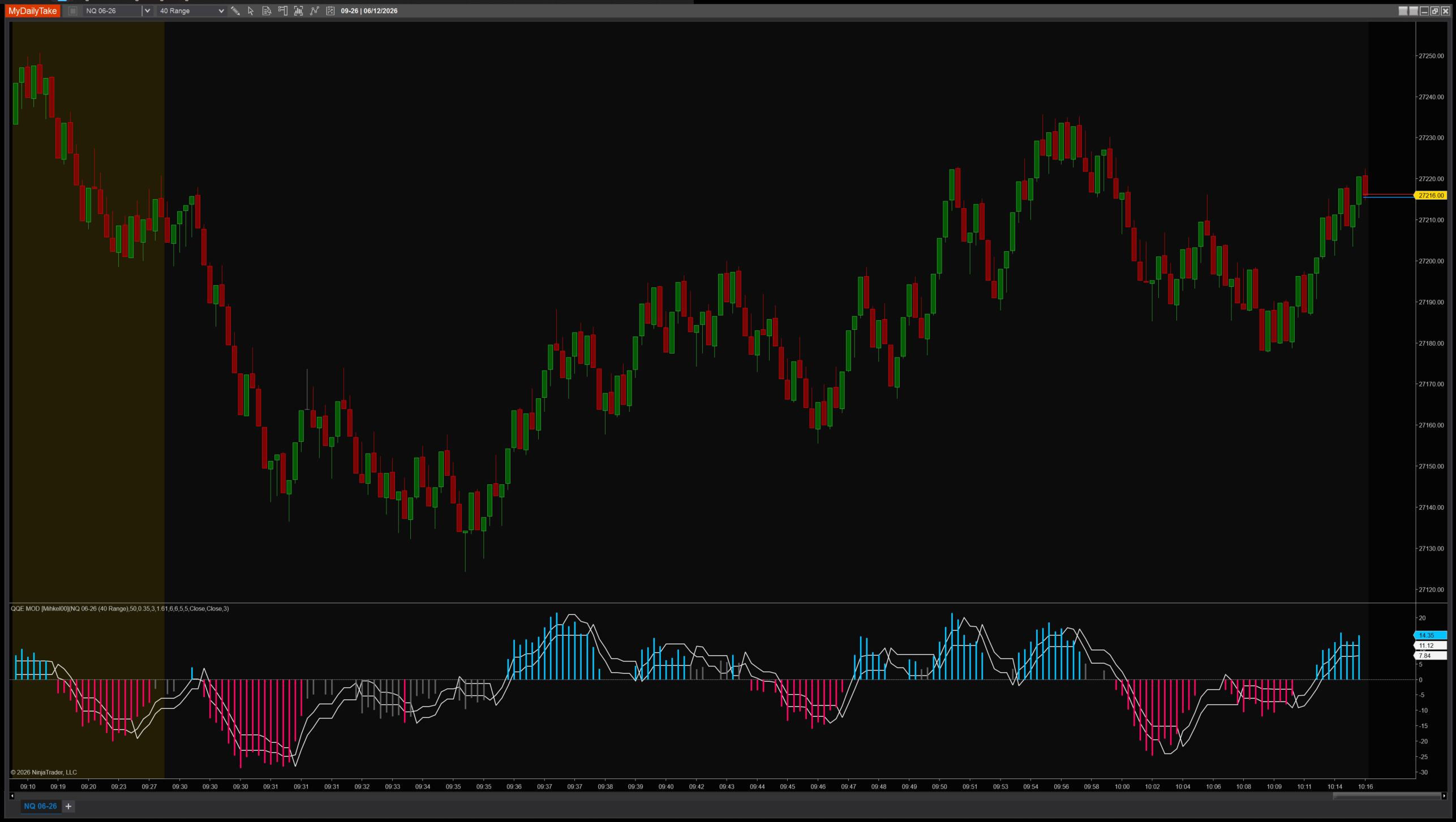
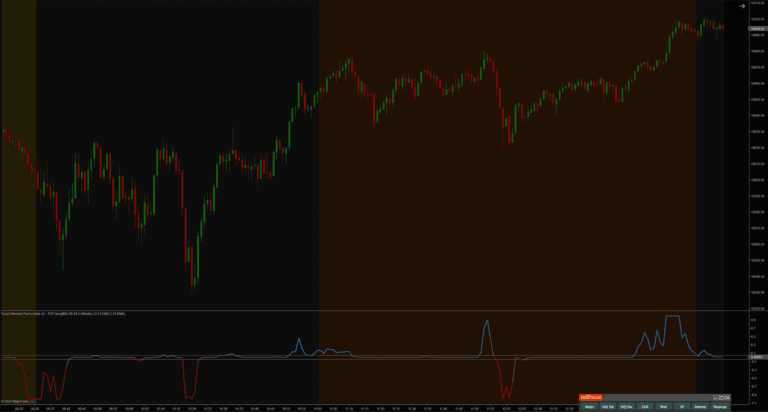
QQE MOD on a 1-minute chart with default settings. The two QQE trend lines (primary slow, secondary fast) sit in the lower panel along with a histogram drawn from the secondary RSI. Bars confirmed by both QQEs (secondary past threshold, primary past Bollinger filter) light up Up / Down. Bars that pass only the secondary threshold print neutral. Chop bars are hidden — the indicator stays quiet when there’s no signal.


The original Pine Script™ code is by Mihkel00 and is licensed under the Mozilla Public License 2.0 (MPL 2.0). This NinjaTrader 8 adaptation is by MyDailyTake.com. The use of Mihkel00’s name or adapted code does not imply endorsement by the original author.