TradingView Money Flow Divergence Zones [AlgoAlpha] Conversion to NinjaTrader 8
MFI divergences fire all the time — most are noise, a few are pivots. The hard part is knowing which is which without staring at the chart. AlgoAlpha’s Money Flow Divergence Zones takes a different approach: every confirmed divergence drops a price-panel rectangle anchored to the recent wick + body extremes. The rectangle stays on the chart until price comes back and either rejects off the level (and you stay in) or sweeps it (and the zone is mitigated).
MFI(close, Len) is smoothed by HMA(21) into the divergence oscillator. Pivot lows / highs on the smoothed oscillator are paired with the corresponding price extremes; a regular bullish divergence fires when price prints a lower low while the oscillator prints a higher low (and the previous pivot is between 5 and 60 bars away). Mirrored bearish logic. Each fire = a new zone.
This post is the NinjaTrader 8 conversion. The full source compiles standalone in indTradingView/, exposes the MFI value, the smoothed oscillator, the signal line, and the bull / bear divergence + mitigation flags as Series<> outputs for strategy use, and is yours to download as a NinjaScript Archive.
Original Pine Script: Money Flow Divergence Zones by AlgoAlpha
License: Mozilla Public License 2.0 (MPL 2.0)
🆚 What Makes Money Flow Divergence Zones Different
Standard divergence indicators draw a line between two oscillator pivots and call it a divergence. Useful, but it’s a 1-D signal — you know there’s a divergence; you don’t know where to act on it. Money Flow Divergence Zones takes the next step and renders the divergence as a 2-D zone on the price panel.
Zone geometry from price extremes. When a bullish divergence fires, the indicator looks back over the last 5 bars and finds the wick extreme (the deepest low) and the body extreme (the lowest open / close). The zone’s edge is the wick; the base is the body. So every zone is a real price-panel rectangle that price has to come back to.
Mitigation modes. The Sweep Type setting picks Body or Wick. Body = zone removed when close crosses the edge. Wick = zone removed when high / low crosses the edge. Allow Rejection mode (Body sweep only) requires two consecutive closes beyond the zone — so a rejection wick keeps the zone alive.
Touch markers. When a candle intersects an active zone with a confirming body, a ▲ / ▼ touch marker prints. So ‘price came back to the zone and bounced’ fires a marker; ‘price came back and chopped sideways’ doesn’t.
Dynamic midline + divergence lines. The 50 midline of the oscillator is a translucent SharpDX band that brightens as the oscillator deviates from 50. Connecting lines between consecutive divergent pivots are drawn on both the oscillator panel and the price panel — same divergence, two views.
⚙️ Settings
Money Flow Divergence Zones exposes its inputs in four property groups: the MFI calculation length, the divergence detection (pivot lookbacks + master toggle), the zone management (expiry age, sweep type, rejection logic, historical zones), and the appearance group with font size, divergence-line + midline toggles, and bull / bear colors.
Settings
| Parameter | Default | Description |
|---|---|---|
| MFI Length | 14 | Lookback for the underlying Money Flow Index. |
Divergence
| Parameter | Default | Description |
|---|---|---|
| Pivot Lookback Left | 14 | Bars to the left required to confirm an oscillator pivot. |
| Pivot Lookback Right | 5 | Bars to the right required to confirm an oscillator pivot. |
| Calculate Divergence | True | Master toggle for divergence detection + zone creation. |
Management
| Parameter | Default | Description |
|---|---|---|
| Max Zone Age | 1000 | Bars after which a zone auto-expires. |
| Sweep Type | Body | Body = zone removed when close crosses; Wick = zone removed when high / low crosses. |
| Allow Rejection | False | When using Body sweep, requires two consecutive closes beyond the zone to remove it. |
| Show Historical Zones | False | Keep mitigated / expired zones drawn (faded). Off = removed when mitigated. |
Appearance
| Parameter | Default | Description |
|---|---|---|
| Label Font Size | 14 | Font size of the ▲ / ▼ divergence and zone-touch labels. |
| Show Divergence Lines | True | Connect consecutive divergent pivots with a line on both panels. |
| Show Dynamic Midline | True | Translucent band at the 50 midline that brightens as the oscillator deviates from 50. |
| Bullish Color | #00FFBB | Bullish zones, oscillator-up coloring, divergence labels. |
| Bearish Color | #FF1100 | Bearish zones, oscillator-down coloring, divergence labels. |
🧠 How It Works
Each bar runs MFI on close, smooths it with HMA, scans for pivots, pairs each pivot against the prior, and either fires a divergence + zone or skips.
- MFI + HMA smoothing. MFI(close, Len) is the bounded [0..100] money flow oscillator. HMA(21) on top of MFI removes high-frequency wiggle without lag, producing the smoothed oscillator that drives divergence detection.
- Pivot detection on the smoothed oscillator. A pivot is confirmed when LookbackLeft bars + LookbackRight bars sit on either side of the candidate. The pivot bar = current bar − LookbackRight. The most recent two pivots per side (highs and lows) are stored.
- Regular divergence. Bullish: price prints a lower low while the oscillator prints a higher low (and the previous pivot is between 5 and 60 bars away). Bearish: price prints a higher high while the oscillator prints a lower high. Hidden divergences are not flagged in this version.
- Zone creation. On a bullish divergence, look back over the last 5 bars for the wick extreme (lowest low) and the body extreme (lowest open / close). The zone rectangle is drawn between those two prices. Bearish: highest high + highest body close.
- Mitigation lifecycle. Each bar, every active zone is checked against the Sweep Type — Body uses close, Wick uses high / low. If Allow Rejection is on (Body mode only), two consecutive committed closes are required before mitigation. Mitigated zones are removed (or kept faded if Show Historical Zones is on).
- Touch markers. When a candle intersects an active zone AND its body confirms the direction (bull body for bull zone), a ▲ / ▼ marker prints at the zone-touch bar.
- Dynamic midline + divergence lines. The 50 midline is a translucent SharpDX band whose brightness scales with |oscillator − 50|. Connecting lines between consecutive divergent pivots are drawn on the oscillator panel via SharpDX and on the price panel via
Draw.Line.
The indicator is non-repainting: a divergence is confirmed LookbackRight bars after the actual oscillator pivot bar, and zone creation uses only closed-bar history.
🛠️ Using It in a Strategy
Money Flow Divergence Zones is built around two event types: divergence-confirmation (BullSignal / BearSignal) and zone-mitigation (BullMitigated / BearMitigated). The most natural strategy use is to enter on the divergence confirmation and exit when the corresponding zone gets mitigated — the zone serves as the stop.
Below is the lifecycle: instantiate in State.DataLoaded, then in OnBarUpdate watch for the bull / bear flags.
private MoneyFlowDivergenceZones mfdz;

protected override void OnStateChange()
{
    if (State == State.SetDefaults)
    {
        Name = "MoneyFlowDivergenceZonesStrategyExample";
    }
    else if (State == State.DataLoaded)
    {
        mfdz = MoneyFlowDivergenceZones(
            14,                                            // MFI Length
            14,                                            // Pivot Lookback Left
            5,                                             // Pivot Lookback Right
            true,                                          // Calculate Divergence
            1000,                                          // Max Zone Age
            MoneyFlowDivergenceZones_Mitigate.Body,        // Sweep Type
            false,                                         // Allow Rejection
            false,                                         // Show Historical Zones
            14,                                            // Label Font Size
            true,                                          // Show Divergence Lines
            true                                           // Show Dynamic Midline
        );
    }
}

protected override void OnBarUpdate()
{
    if (CurrentBar < 50) return;

    // Enter on confirmed divergence
    if (mfdz.BullSignal[0] && Position.MarketPosition != MarketPosition.Long)
        EnterLong();
    if (mfdz.BearSignal[0] && Position.MarketPosition != MarketPosition.Short)
        EnterShort();

    // Exit when the zone is mitigated (price swept the level)
    if (Position.MarketPosition == MarketPosition.Long  && mfdz.BullMitigated[0]) ExitLong();
    if (Position.MarketPosition == MarketPosition.Short && mfdz.BearMitigated[0]) ExitShort();
}
All seven outputs are Series<>. The mitigation flags fire one bar after the body / wick crosses the zone — useful as a clean exit signal that aligns with the visual zones on the chart.
Public Outputs
| Output | Type | Description |
|---|---|---|
| Mfi[0] |
Series | Raw MFI value (0–100). |
| SmoothedOsc[0] |
Series | HMA(21)-smoothed MFI — the divergence oscillator. |
| SignalLine[0] |
Series | Smoothed oscillator shifted one bar — used as the signal line. |
| BullSignal[0] |
Series | True on the bar a bullish divergence is confirmed. |
| BearSignal[0] |
Series | True on the bar a bearish divergence is confirmed. |
| BullMitigated[0] |
Series | True on the bar a bullish zone is mitigated (price swept the level). |
| BearMitigated[0] |
Series | True on the bar a bearish zone is mitigated. |
🔄 Conversion Notes
A few things changed in the translation from Pine Script to NinjaScript:
Zones via Draw.Rectangle 11-arg overload. Pine’s box.new + box.set_right pattern becomes per-zone Draw.Rectangle calls with explicit fill brush, outline brush, and opacity. The right edge is updated each bar by re-calling Draw.Rectangle with the same tag — NT8 treats it as a move, not a new shape.
Sweep Type as an enum. Pine’s string-input switch is replaced with a typed C# enum (MoneyFlowDivergenceZones_Mitigate) so the property dialog renders a proper dropdown.
Allow Rejection two-bar confirmation. Pine’s barssince trick for the rejection-confirm logic becomes a per-zone SweepCount that increments on each cross and resets on a non-cross bar. Once the count hits 2, the zone is marked for mitigation.
Sized labels via SharpDX TextFormat. Pine’s label.size = size.normal family doesn’t have a direct NT8 analog. The conversion uses a SharpDX TextFormat sized by the LabelFontSize property so the user sees a real font-size slider.
Dynamic midline via brightness-modulated SharpDX band. Pine’s decorative midline column was omitted (visual sugar). The dynamic midline replaces it: a translucent SharpDX band at the 50 line whose alpha scales with |oscillator − 50|, brightening when the oscillator deviates and fading when near 50.
Documented scope drops: the decorative oscillator midline column (style=columns, value=51, histbase=49) is omitted as pure visual sugar. The redundant sub-panel divergence labels are also omitted — the oscillator pivot lines + price-panel labels carry the same information without doubling the marker count.
Series-based public outputs. Seven outputs cover both the continuous values (Mfi, SmoothedOsc, SignalLine) and the event-based flags (BullSignal, BearSignal, BullMitigated, BearMitigated). Strategies can mix both.
📦 Download
The full source is available as a free NinjaScript Archive. To install:
- Download the
.zipfile below. - In NinjaTrader 8, go to Tools → Import → NinjaScript Add-On.
- Select the downloaded
.zipfile. - The indicator will appear under Indicators → indTradingView → Money Flow Divergence Zones [AlgoAlpha] on your chart.
📊 Chart Example
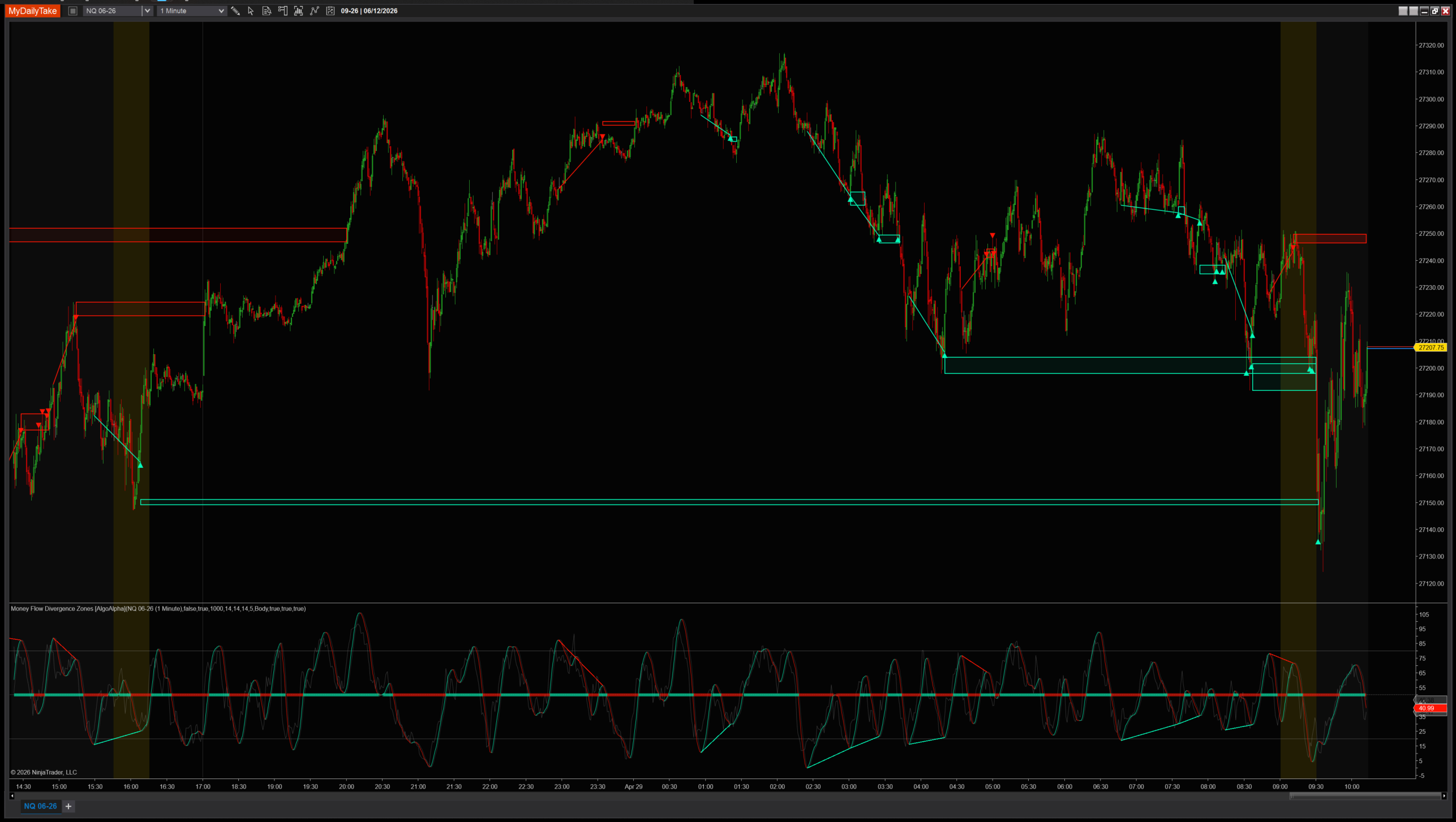
Money Flow Divergence Zones on a 1-minute chart with default settings. Each confirmed divergence drops a colored rectangle on the price panel — bull below price for bullish divergences, bear above for bearish. Zones live until body or wick mitigation. The lower panel shows the HMA-smoothed MFI with a dynamic midline that brightens when momentum deviates. ▲ / ▼ touch markers fire when price returns to a zone with a confirming body.


The original Pine Script™ code is by AlgoAlpha and is licensed under the Mozilla Public License 2.0 (MPL 2.0). This NinjaTrader 8 adaptation is by MyDailyTake.com. The use of AlgoAlpha’s name or adapted code does not imply endorsement by the original author.