TradingView Nadaraya-Watson Envelope (Non-Repainting) [jdehorty] Conversion to NinjaTrader 8
jdehorty’s Nadaraya-Watson Envelope is a kernel-regression non-repainting trend filter. The Rational-Quadratic kernel weighs each historical bar by a smooth, fast-decaying function — recent bars get the highest weight, older bars decay quickly. The weighted sum of close gives a ‘kernel close’ that’s smooth without the lag of a moving average and without the repainting common to other kernel-regression indicators.
On top of the kernel close, a kernel-ATR envelope at NearFactor / FarFactor multiples builds the channel. SharpDX upper / lower translucent fills between the kernel close and the high / low projections shade the envelope’s interior — translucent at 40% alpha to the FarFactor band, 20% alpha to the NearFactor band. The estimator line is colored bull-green when its slope is rising, bear-red when falling.
This post is the NinjaTrader 8 conversion. The full source compiles standalone in indTradingView/, exposes the kernel close + the six envelope levels (Near / Avg / Far for both sides) as Series<double> outputs for strategy use, and is yours to download as a NinjaScript Archive.
Original Pine Script: Nadaraya-Watson Envelope (Non-Repainting) by jdehorty
License: Mozilla Public License 2.0 (MPL 2.0)
🆚 What Makes Nadaraya-Watson Envelope Different
Most kernel-regression indicators repaint — they recompute the entire kernel for every bar and the historical line shifts as new data arrives. jdehorty’s contribution was producing a non-repainting form: the kernel weights are pre-computed once over a fixed window, and the kernel close is read by reading current and historical bars through that fixed window. Once a bar’s kernel close is computed, it never updates.
Rational-Quadratic kernel. Pine: w_i = (1 + (i² / (Alpha × Lookback²)))^(−Alpha). The decay is faster than Gaussian and slower than Cauchy — a sweet spot for financial data where you want recent bars to dominate but not so much that the kernel collapses to a moving average.
Kernel-ATR envelope. The ‘kernel ATR’ is the same kernel applied to true-range, then RMA-smoothed. The envelope sits at ±NearFactor × kernelATR (the near band) and ±FarFactor × kernelATR (the far band). So the envelope width adapts to recent volatility through the kernel-ATR rather than a plain ATR.
Slope-driven estimator color. The kernel close line is colored bull-green when its slope is positive (rising) and bear-red when negative. Visual peripheral cue — at a glance, you know whether the kernel is committing direction or rolling over.
⚙️ Settings
NWE exposes its inputs in three property groups: the kernel parameters, the envelope ATR + factors, and the colors group with bull/bear estimator colors plus upper/lower envelope tones.
Kernel
| Parameter | Default | Description |
|---|---|---|
| Lookback | 8 | Width of the Rational-Quadratic kernel. |
| Alpha | 8.0 | Kernel smoothing exponent. Higher = faster decay (more weight on recent bars). |
| Start Bar | 25 | Bars before the kernel begins evaluating. Pine convention to skip warmup. |
Envelope
| Parameter | Default | Description |
|---|---|---|
| ATR Length | 60 | Lookback for the kernel-ATR (the kernel-smoothed True Range). |
| Near Factor | 1.5 | Inner-band envelope multiplier on kernel ATR. |
| Far Factor | 8.0 | Outer-band envelope multiplier on kernel ATR. |
Colors
| Parameter | Default | Description |
|---|---|---|
| Bullish Estimator Color | Green 50% | Estimator line color when slope is rising. |
| Bearish Estimator Color | Red 50% | Estimator line color when slope is falling. |
| Upper Boundary Color | Red 40% | Upper envelope boundaries and shaded region. |
| Lower Boundary Color | Green 40% | Lower envelope boundaries and shaded region. |
🧠 How It Works
Each bar runs the pre-computed kernel weights over close/high/low to produce the kernel estimator and ATR, then computes the envelope levels.
- Kernel weight precomputation. On the first bar after StartBar, compute weights w_i = (1 + (i² / (Alpha × Lookback²)))^(−Alpha) for i = 0 .. kernelWidth − 1. The width is capped at max(50, min(500, Lookback × 12)) — the kernel decays fast, so beyond this point contributions are negligible.
- Kernel close. Each bar, NwEstimator = sum(w_i × close[i]) / sum(w_i) over the precomputed window. The result is a smooth, non-lagging estimator of the trend.
- Kernel high / low. Same kernel applied to high and low — call them kernelHigh, kernelLow. Used for the kernel-ATR computation.
- Kernel ATR. True range from the kernel highs / lows / closes, RMA-smoothed over AtrLength bars. The kernel-ATR is the envelope’s volatility measure — adapts smoothly to recent range without the bumpy edges of plain ATR.
- Envelope construction. UpperNear = NwEstimator + NearFactor × kernelATR. UpperFar = NwEstimator + FarFactor × kernelATR. UpperAvg = (UpperNear + UpperFar) / 2. Symmetric for the lower side.
- Slope coloring. NwEstimator[0] vs NwEstimator[1] determines bull / bear coloring. Per-bar PlotBrushes assignment.
- Translucent fills. SharpDX trapezoids between adjacent envelope levels — UpperAvg ↔ UpperFar at 40% alpha, UpperAvg ↔ UpperNear at 20% alpha, mirrored on the lower side.
The indicator is non-repainting — once a bar’s kernel close is computed, it doesn’t update. The kernel weights are fixed; only the input (close, high, low) feeds them, so each bar’s output is final.
🛠️ Using It in a Strategy
Nadaraya-Watson Envelope’s most natural strategy use is mean-reversion at the far envelope. The example below enters long when close pokes below LowerFar (price stretched far below the kernel mean) and exits when it crosses back through NwEstimator. Symmetric for shorts at UpperFar.
Below is the lifecycle: instantiate in State.DataLoaded, then in OnBarUpdate watch for envelope penetrations.
private NadarayaWatsonEnvelopeJdehorty nwe;

protected override void OnStateChange()
{
    if (State == State.SetDefaults)
    {
        Name = "NadarayaWatsonEnvelopeStrategyExample";
    }
    else if (State == State.DataLoaded)
    {
        nwe = NadarayaWatsonEnvelopeJdehorty(
            8,      // Lookback
            8.0,    // Alpha
            25,     // Start Bar
            60,     // ATR Length
            1.5,    // Near Factor
            8.0     // Far Factor
        );
    }
}

protected override void OnBarUpdate()
{
    if (CurrentBar < 100) return;

    // Mean-reversion: enter at the far envelope, exit at the kernel close.
    bool stretchedLow  = Close[0] < nwe.LowerFar[0] && Close[1] >= nwe.LowerFar[1];
    bool stretchedHigh = Close[0] > nwe.UpperFar[0] && Close[1] <= nwe.UpperFar[1];

    if (stretchedLow  && Position.MarketPosition != MarketPosition.Long)  EnterLong();
    if (stretchedHigh && Position.MarketPosition != MarketPosition.Short) EnterShort();

    // Take profit at the estimator
    if (Position.MarketPosition == MarketPosition.Long  && Close[0] >= nwe.NwEstimator[0]) ExitLong();
    if (Position.MarketPosition == MarketPosition.Short && Close[0] <= nwe.NwEstimator[0]) ExitShort();
}
All seven outputs are Series<double>. nwe.NwEstimator[0] can substitute for any moving-average reference; nwe.UpperFar / LowerFar are the extremes for fade entries.
Public Outputs
| Output | Type | Description |
|---|---|---|
| NwEstimator[0] |
Series | Kernel-regression estimator (kernel close). |
| UpperFar[0] |
Series | Upper FarFactor × kernel-ATR envelope. |
| UpperAvg[0] |
Series | Upper average between near and far. |
| UpperNear[0] |
Series | Upper NearFactor × kernel-ATR envelope. |
| LowerNear[0] |
Series | Lower NearFactor × kernel-ATR envelope. |
| LowerAvg[0] |
Series | Lower average between near and far. |
| LowerFar[0] |
Series | Lower FarFactor × kernel-ATR envelope. |
🔄 Conversion Notes
A few things changed in the translation from Pine Script to NinjaScript:
Pre-computed kernel weights array. Pine recomputes the kernel inside its for loop every bar — fine for a script with a max bars limit, but inefficient on a live chart with many bars. The conversion pre-computes the weights once into a double[], capped at max(50, min(500, Lookback × 12)) since the kernel decays fast beyond this point.
Manual RMA on kernel TR. NT8’s ATR primitive uses bar TR, not kernel-derived TR. The conversion implements the RMA recurrence inline, fed by kernel-derived true range — matches Pine’s ta.atr on the kernel inputs.
Four-brush translucent fill. Pine’s per-region fill() calls become four pre-built SharpDX SolidColorBrush instances at fixed alpha levels (40% / 20%). Per-bar SharpDX trapezoids between adjacent envelope levels use these brushes directly — no per-frame brush construction.
Series-based public outputs. Seven outputs cover the kernel close + all six envelope levels — a strategy can read any level directly without touching the indicator’s drawing layer.
📦 Download
The full source is available as a free NinjaScript Archive. To install:
- Download the
.zipfile below. - In NinjaTrader 8, go to Tools → Import → NinjaScript Add-On.
- Select the downloaded
.zipfile. - The indicator will appear under Indicators → indTradingView → Nadaraya-Watson Envelope (Non-Repainting) [jdehorty] on your chart.
📊 Chart Example
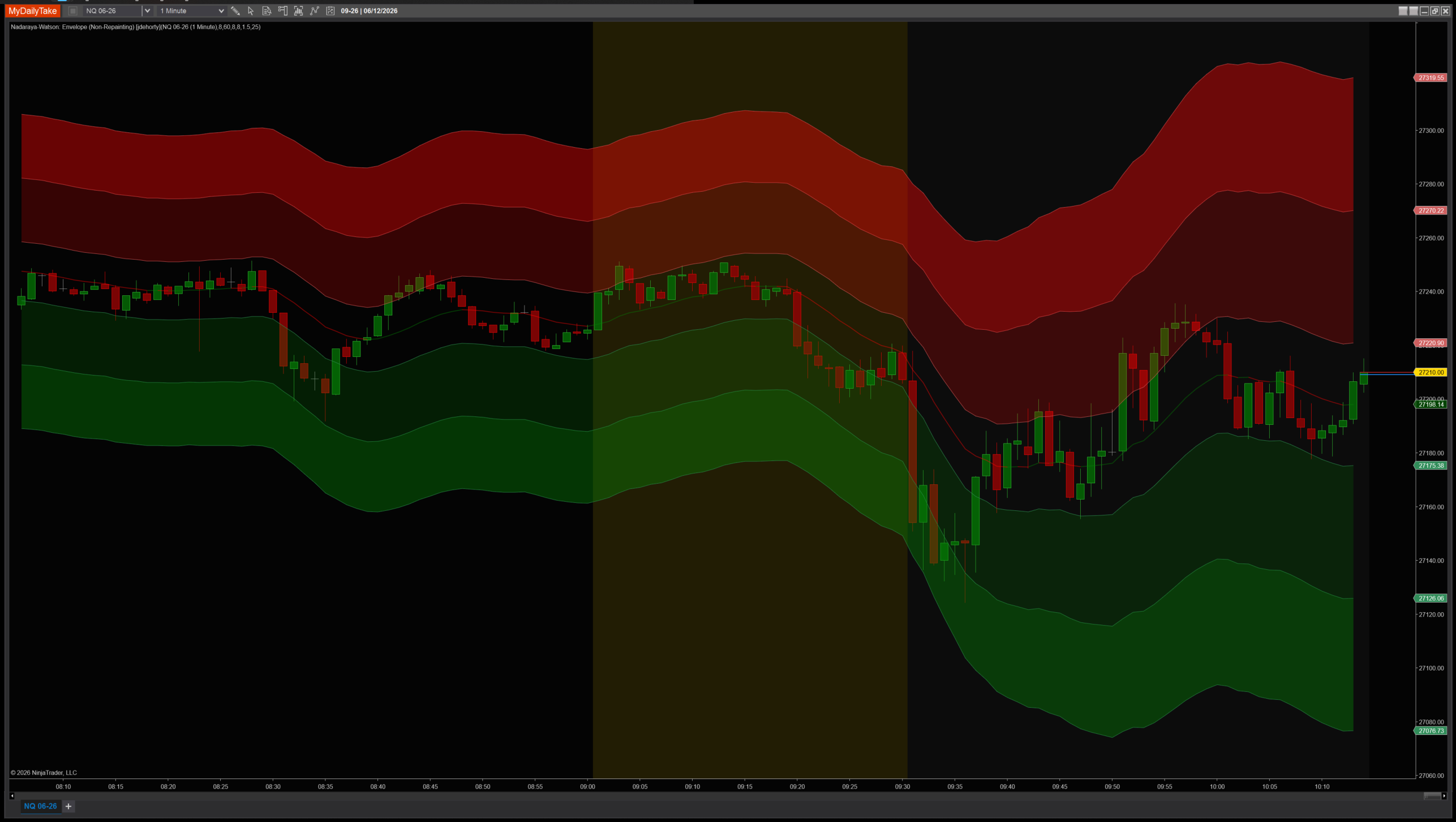
Nadaraya-Watson Envelope on a 1-minute chart with default settings (Lookback=8, Alpha=8, ATR=60, Near=1.5, Far=8). The kernel estimator glides through price, colored green when rising and red when falling. The translucent envelope sits at NearFactor and FarFactor multiples of kernel ATR — Penetrations of the far bands are the canonical fade-back-to-mean trade signals.


The original Pine Script™ code is by jdehorty and is licensed under the Mozilla Public License 2.0 (MPL 2.0). This NinjaTrader 8 adaptation is by MyDailyTake.com. The use of jdehorty’s name or adapted code does not imply endorsement by the original author.