TradingView KNN Supertrend Horizon [LuxAlgo] Conversion to NinjaTrader 8
Most SuperTrend variants are deterministic: ATR × multiplier sets the band width and the trend flips when price closes the wrong side. LuxAlgo’s KNN Supertrend Horizon takes a different swing — it runs a k-nearest-neighbors classifier over recent (RSI, ATR%) feature space, votes on the next-bar SuperTrend direction, EMA-smooths the probability, and only flips when the smoothed probability clears a hysteresis buffer.
On top of the ML-gated trend line, it overlays glow bars at the top and bottom of the panel that pulse in proportion to the model’s confidence, layered 3D-style rejection orbs on contradiction wicks, gradient candle coloring, and a corner-anchored SharpDX dashboard that reports the live probability, bars-in-trend, and ATR-relative volatility.
This post is the NinjaTrader 8 conversion. The full source compiles standalone in indTradingView/, exposes the SuperTrend value, ML probability, regime flag, and rejection signals as Series<> outputs for strategy use, and is yours to download as a NinjaScript Archive.
Original Pine Script: KNN Supertrend Horizon by LuxAlgo
License: Attribution-NonCommercial-ShareAlike 4.0 International (CC BY-NC-SA 4.0)
🆚 What Makes KNN Supertrend Horizon Different
ML voting on the trend. Each bar, the indicator computes two features (RSI on a smoothed source, plus ATR/price as a relative-volatility metric), then finds the K most similar historical bars in that two-feature space. Each neighbor votes for the direction the SuperTrend was on its own next bar. The vote tally becomes a probability that the current SuperTrend direction is ‘correct.’
Hysteresis buffer prevents whipsaw. The smoothed probability has to clear 50% by a configurable buffer (default 5%) before the regime flips. So a flip from down to up requires sustained probability above 55%, and the reverse requires it to drop below 45%. The dead zone in the middle filters out the noise that plagues raw threshold crossings.
Layered rejection orbs and glow bars. When a wick contradicts the active trend (high pierces resistance in a down-trend, or low pierces support in an up-trend) and the wick-to-body ratio exceeds a threshold, the indicator draws a five-pass layered orb at the wick extreme — outer halo, mid glow, core, highlight, sparkle. Glow bars at the panel top and bottom pulse with the model’s confidence — visual reinforcement of the regime.
⚙️ Settings
KNN Supertrend Horizon exposes its inputs in six property groups: machine-learning parameters (K, search window), SuperTrend bands (ATR length, factor), noise filtering (HMA smoothing, ML buffer), rejection-orb gating, visual styling, and dashboard placement.
Machine Learning
| Parameter | Default | Description |
|---|---|---|
| K-Neighbors | 10 | Number of nearest neighbors used to vote on the next-bar SuperTrend direction. |
| Search Window | 500 | How many historical bars to scan for nearest-neighbor lookups. |
SuperTrend
| Parameter | Default | Description |
|---|---|---|
| ATR Length | 10 | ATR period used inside the SuperTrend calculation. |
| Factor | 3.0 | ATR multiplier for the SuperTrend bands. |
Noise Filter
| Parameter | Default | Description |
|---|---|---|
| Smooth Price Input | True | Apply HMA smoothing to the price source before computing the RSI feature. |
| Smoothing Length | 10 | HMA length for the smoothed price source. |
| ML Confidence Buffer (%) | 5.0 | Hysteresis around 50% — smoothed probability must clear 50±buffer to flip direction. |
Rejection Signals
| Parameter | Default | Description |
|---|---|---|
| Show 3D Rejection Orbs | True | Render layered rejection orbs at wicks that contradict the current SuperTrend. |
| Min Wick-to-Body Multiplier | 1.5 | Wick must be at least this many times the body for an orb to fire. |
| Min Bubble Gap (Bars) | 5 | Refractory period between consecutive rejection orbs. |
Visual
| Parameter | Default | Description |
|---|---|---|
| Liquid Smoothness | 20 | EMA length applied to the raw KNN probability before threshold detection. |
| Vibrancy | 1.5 | Power curve applied to confidence intensity — higher values intensify saturation. |
| Gradient Candle Coloring | True | Recolor candles by trend with confidence-driven brightness. |
Dashboard
| Parameter | Default | Description |
|---|---|---|
| Show Dashboard | True | Render the SharpDX HUD with ML and SuperTrend stats. |
| Position | TopRight | Corner placement for the dashboard. |
| Size | Small | Overall dashboard scale. |
🧠 How It Works
Each bar runs five layered computations: feature extraction, KNN voting, probability smoothing, regime gating, and visual rendering.
- Feature extraction. Optionally HMA-smooth the source close. Compute RSI(14) on the smoothed source. Compute (ATR(14) / price) × 100 as a relative-volatility feature. These two scalars are the bar’s coordinates in feature space.
- SuperTrend value. Compute the classic SuperTrend with band-locking — upper band ratchets up while the trend is down, lower band ratchets down while the trend is up. Direction flips on close-vs-band crosses. Store the prior bar’s SuperTrend direction as the ‘truth label’ for KNN training.
- KNN voting. For each historical bar in the search window, compute Euclidean distance from the current bar’s (RSI, ATR%) to that historical bar’s (RSI, ATR%). Sort distances, take the K smallest, and tally how many of those neighbors had a bullish next-bar SuperTrend. The bull/(bull+bear) ratio × 100 is the raw KNN probability.
- Probability smoothing. Run an EMA over the raw probability with the Liquid Smoothness length. The smoothed value drives all downstream visual decisions.
- Regime gating with hysteresis. The MlBullish flag flips up when smoothed probability > 50 + buffer, and flips down when smoothed probability < 50 − buffer. In between, the flag holds its prior state — that's the noise dead-zone.
- Rejection-orb detection. When a wick contradicts the active regime AND the wick-to-body ratio exceeds the configured multiplier AND we’re past the bubble-gap refractory, draw a five-pass layered orb at the wick extreme: black halo, theme-color mid, theme-color core, white highlight, white sparkle. Each layer has its own opacity and offset for the 3D effect.
- Glow bars + gradient candles + dashboard. Render the panel-top and panel-bottom glow bars per visible bar, intensity proportional to that bar’s confidence. Recolor each candle via BarBrushes/CandleOutlineBrushes if Gradient Candle Coloring is on. Render the SharpDX dashboard at the configured corner with current regime, probability, bars-in-trend, ST distance, and ATR-relative volatility.
The indicator is non-repainting: every output is computed on the closed bar’s data and never updates after the bar confirms.
🛠️ Using It in a Strategy
KNN Supertrend Horizon exposes the regime, smoothed probability, and rejection signals as Series<> outputs. The simplest strategy gates entries on the regime flag transitioning, and uses rejection signals as counter-trend tactical entries.
Below is the lifecycle: instantiate in State.DataLoaded, then in OnBarUpdate read the regime and rejection signals.
private KnnSupertrendHorizon knn;

protected override void OnStateChange()
{
    if (State == State.SetDefaults)
    {
        Name = "KnnSupertrendHorizonStrategyExample";
    }
    else if (State == State.DataLoaded)
    {
        knn = KnnSupertrendHorizon(
            10,                                              // K-Neighbors
            500,                                             // Search Window
            10,                                              // ATR Length
            3.0,                                             // Factor
            true,                                            // Smooth Source
            10,                                              // Smoothing Length
            5.0,                                             // ML Buffer
            true,                                            // Show Orbs
            1.5,                                             // Wick Multiplier
            5,                                               // Bubble Gap
            20,                                              // Liquid Smoothness
            1.5,                                             // Vibrancy
            true,                                            // Color Candles
            true,                                            // Show Dashboard
            KnnSupertrendHorizon_DashCorner.TopRight,        // Dashboard Position
            KnnSupertrendHorizon_DashSize.Small              // Dashboard Size
        );
    }
}

protected override void OnBarUpdate()
{
    if (CurrentBar < 501) return;

    // Detect regime flip this bar
    bool flippedBull = knn.MlBullish[0] && !knn.MlBullish[1];
    bool flippedBear = !knn.MlBullish[0] && knn.MlBullish[1];

    if (flippedBull) EnterLong();
    if (flippedBear) EnterShort();

    // Rejection orbs as tactical counter-trend entries
    if (knn.BullRejection[0] && Position.MarketPosition != MarketPosition.Long)
        EnterLong("RejectionLong");
    if (knn.BearRejection[0] && Position.MarketPosition != MarketPosition.Short)
        EnterShort("RejectionShort");

    // Trail stop along the SuperTrend line
    if (Position.MarketPosition == MarketPosition.Long)
        SetStopLoss(CalculationMode.Price, knn.MlSupertrend[0]);
    else if (Position.MarketPosition == MarketPosition.Short)
        SetStopLoss(CalculationMode.Price, knn.MlSupertrend[0]);
}
All outputs are Series<>, so you can index back in time freely. The Update() wrapper inside each non-plot getter handles sync.
Public Outputs
| Output | Type | Description |
|---|---|---|
| MlSupertrend[0] |
Series | The active SuperTrend line value. |
| SmoothedProb[0] |
Series | EMA-smoothed KNN voting probability (0–100). >50+buffer = bullish bias, <50−buffer = bearish. |
| MlBullish[0] |
Series | Current regime flag — true when smoothed probability supports an up-trend. |
| BullRejection[0] |
Series | True on a bar where a wick rejection contradicts the active down-trend (potential long signal). |
| BearRejection[0] |
Series | True on a bar where a wick rejection contradicts the active up-trend (potential short signal). |
🔄 Conversion Notes
A few things changed in the translation from Pine Script to NinjaScript:
Inline KNN with sorted-distance threshold. Pine’s array.sort + threshold extraction becomes an in-method allocation of distance arrays, sorted once per bar. The K-th smallest distance defines the threshold; all neighbors at or below it cast a vote.
Layered rejection orbs via SharpDX. Pine’s five label.new calls for the 3D-orb effect become five SharpDX FillEllipse passes per orb in OnRender, with cached per-color brushes and dispose-on-target-change lifecycle.
Glow bar palette quantization. Per-bar glow alpha would otherwise allocate hundreds of brushes per render frame. The conversion pre-builds an 8-level alpha palette per side (bull and bear) at OnRenderTargetChanged; per-bar render selects from the palette by quantizing the bar’s confidence.
Gradient candle coloring via BarBrushes. Pine’s barcolor() with confidence-modulated alpha is replaced by BarBrushes/CandleOutlineBrushes assignment per bar, with the alpha scaled by the smoothed probability.
SharpDX dashboard with corner placement and three-tier sizing. The Pine table is replaced with a SharpDX-rendered HUD that supports three corner positions and five overall size presets, with full font-size control and an opacity slider on the background panel.
Series-based public outputs. Five outputs are exposed as Series<> for strategy consumption — MlSupertrend, SmoothedProb, MlBullish, BullRejection, BearRejection.
📦 Download
The full source is available as a free NinjaScript Archive. To install:
- Download the
.zipfile below. - In NinjaTrader 8, go to Tools → Import → NinjaScript Add-On.
- Select the downloaded
.zipfile. - The indicator will appear under Indicators → indTradingView → KNN Supertrend Horizon [LuxAlgo] on your chart.
📊 Chart Example
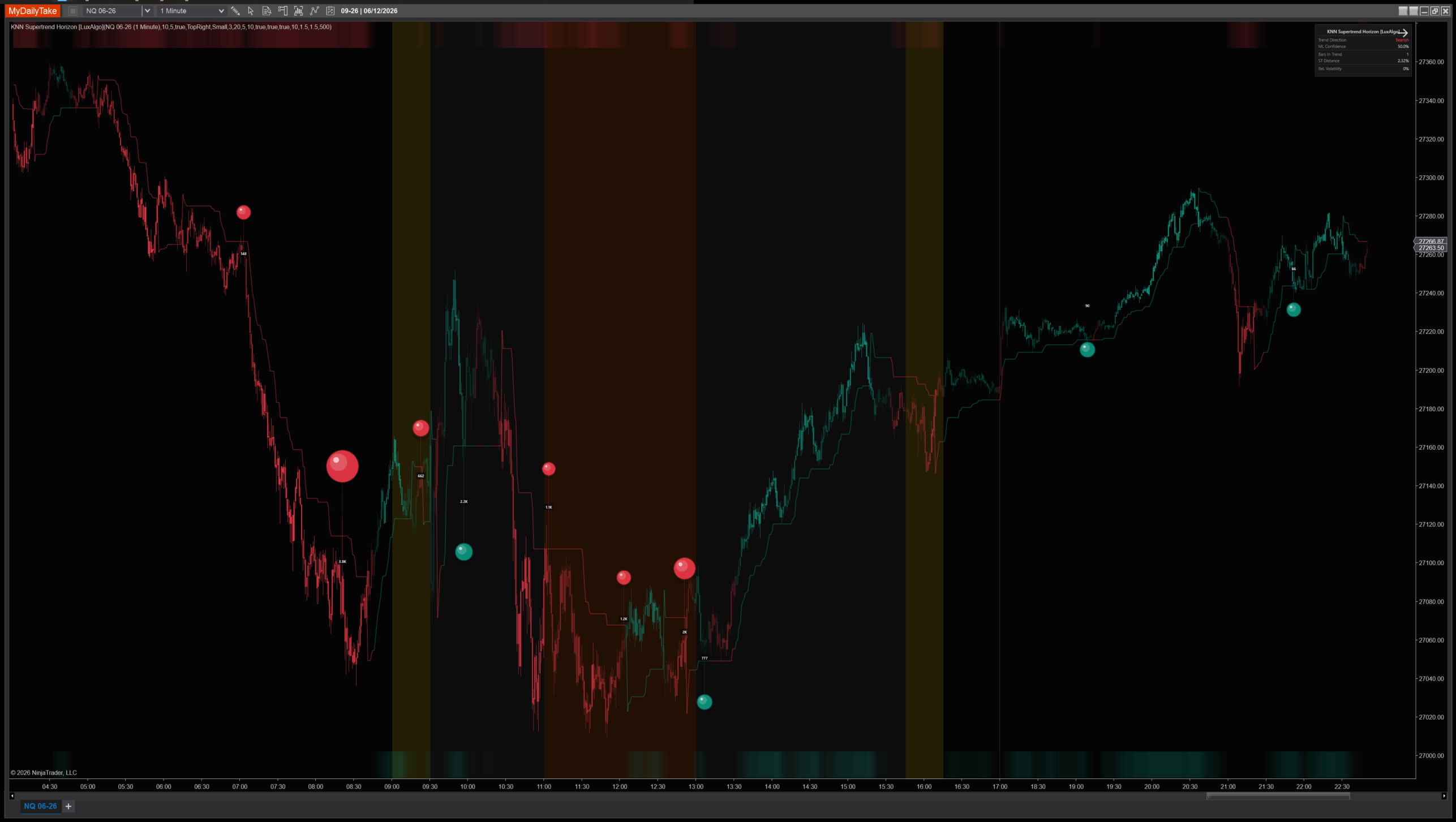
KNN Supertrend Horizon on a 1-minute chart with default settings. The trend line is gated by the smoothed KNN probability — notice how it holds direction through wicks the standard SuperTrend would flip on. Glow bars at the panel top and bottom pulse with confidence; rejection orbs mark wick contradictions; the corner dashboard shows the live ML state. Gradient candles encode confidence directly into the bar color.


The original Pine Script™ code is by LuxAlgo and is licensed under the Attribution-NonCommercial-ShareAlike 4.0 International (CC BY-NC-SA 4.0). This NinjaTrader 8 adaptation is by MyDailyTake.com. The use of LuxAlgo’s name or adapted code does not imply endorsement by the original author.


![Cosine Kernel Regressions [QuantraSystems] Conversion](https://mydailytake.com/wp-content/uploads/2024/06/CosineKernelRegressions_5-Minute_NQ-768x458.png)