Acceleration Renko: A NinjaTrader 8 Bar Type Whose Bricks Shrink as a Run Extends
A free NinjaTrader 8 Renko bar type whose bricks get narrower the further a run extends — so momentum reads as bar density instead of bar size. Here’s the idea, how it behaves, what it costs you, and the download.
When I started out, I couldn’t keep up with the ideas. Every few weeks there was something I hadn’t seen before — a different way of drawing a chart, a different way of thinking about structure, something genuinely odd that I’d put on a chart just to see what it did. Half of it was useless. That was fine. The point was that it was new.
Lately I look at most indicators, and most of the popular methods, and think: I’ve seen this before.
Maybe that’s just my frame of reference. Look at enough charts for enough years and everything starts rhyming with something. But I missed being surprised, and complaining about it doesn’t produce anything, so I went the other way — I picked something I use constantly and asked what hadn’t been tried.
I use Renko constantly. So I started there.
🧱 There are a lot of Renko variants
More than people realise. If you go looking, you’ll find bars that let you set the reversal distance independently of the brick size. Bars that draw wicks instead of clean rectangles. Bars that shift the open so the bricks look like candles. Bars that anchor to the actual crossing price instead of a fixed grid, so the whole ladder drifts. Bars that run the output through a Heikin-Ashi transform. Bars that size the brick from the average daily range, or from recent volatility, so the chart stays readable when conditions change.
These are real ideas and several of them are genuinely clever. But lay them side by side and they’re variations on a fairly narrow set of questions: how far price has to travel to reverse, what the brick looks like when you draw it, and occasionally how wide to make it.
That’s not a criticism of anyone’s work. It’s an observation about where the design space has been explored — and, more usefully, where it hasn’t.
🔍 Nearly all of them decide the size in advance
Here’s the thing almost all of them have in common, including the adaptive ones.
The brick’s width is settled before the brick is drawn. Either it’s a number you typed into a settings box, or it’s measured from the market — volatility over the last N ticks, the average range of the last few sessions. Both of those are ambient measurements. They describe the weather around you.
Which means: a chart that is sixteen bricks into an uninterrupted run sizes brick seventeen exactly the way it sized brick one. A volatility-scaled Renko will give you the same width for both, because the volatility reading is the same at that moment either way. Nothing in the model has any idea how far the current run has already gone.
Price goes in, a threshold gets tested, a brick comes out. One direction, every time.
💡 Close the loop
The direction I’d seen least of was this: let the brick’s width depend on the bricks already drawn. It’s not unheard of — I’ve come across a few things that head this way — but they’re few and far between. Almost everything else varies one of those first three.
Not a market statistic. A count of the bar type’s own output — how many consecutive same-direction bricks have printed since the last reversal. Call it the leg count.
That’s a small change with a structural consequence. A standard Renko is feedforward: price in, brick out. Feeding the leg count back into the threshold makes it a closed loop — the chart starts reacting to itself.
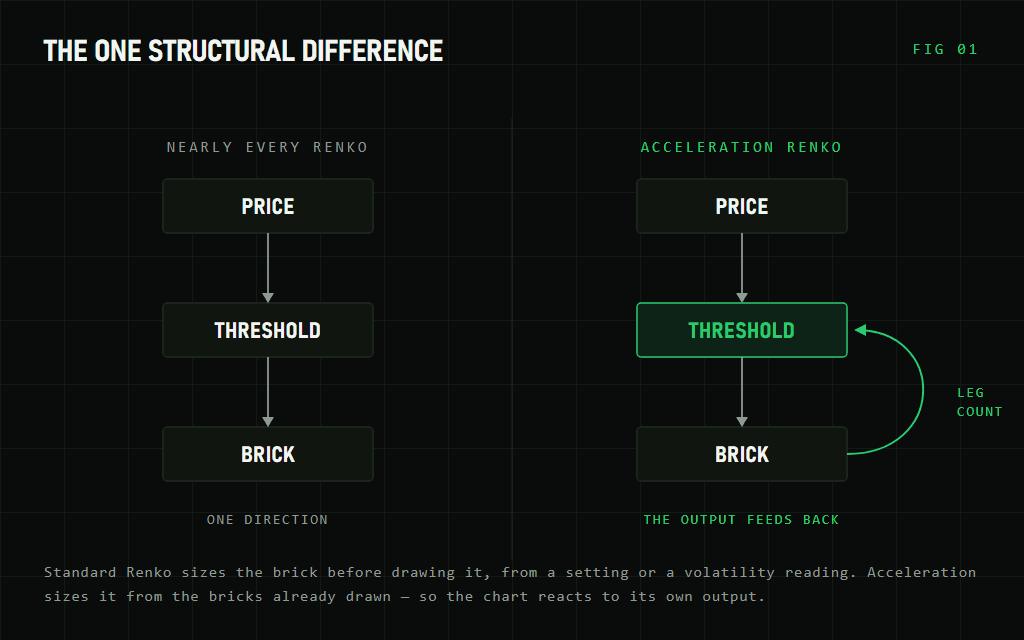
There are two obvious things to do with that. You can make bricks grow as a run extends, which damps a trend: a long move stops flooding the screen, and each additional brick demands more than the last. Or you can make them shrink, which does the opposite — it amplifies. That’s the one I found more interesting, and it’s the one I built.
⚡ Acceleration Renko
The rule is one line:
shrink = 1 - (legCount * step)
brick  = baseBrick * shrink
Here it is on NQ at an 80-tick base and an 8% step. Widths are snapped to whole ticks so each brick sits on the price grid.
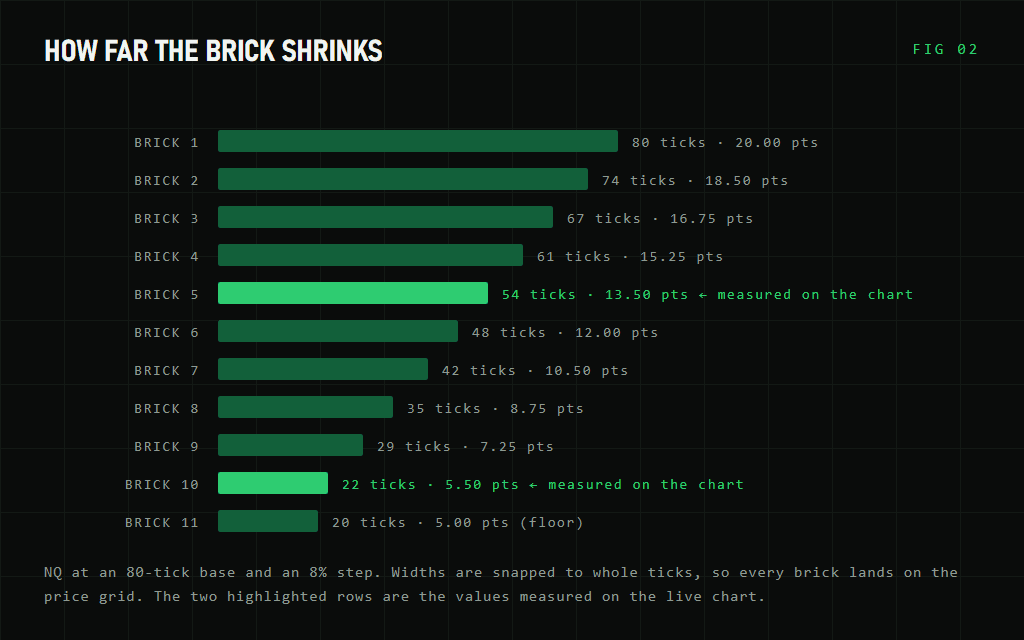
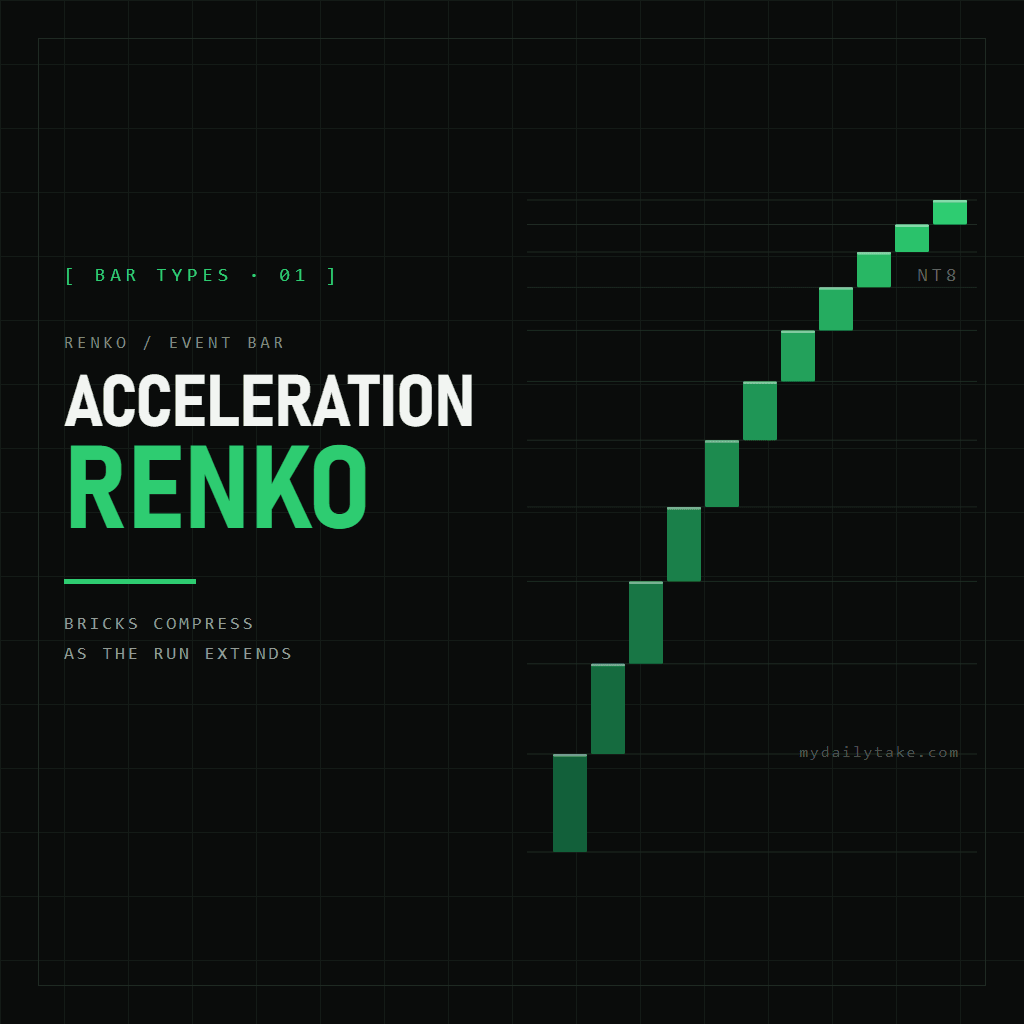
A sustained push therefore prints progressively finer bricks. The move doesn’t just travel further — it starts producing more bars per point as it goes. Momentum becomes something you see in the density of the chart rather than something you infer from the size of the bars.
A reversal resets the count, and the next run starts over at full width.
🔁 Why it compounds
Read the loop again and you’ll notice it feeds itself.
A smaller brick means the next threshold is closer. A closer threshold means it gets hit sooner. Getting hit sooner means another brick prints, which increments the leg count, which shrinks the brick again.
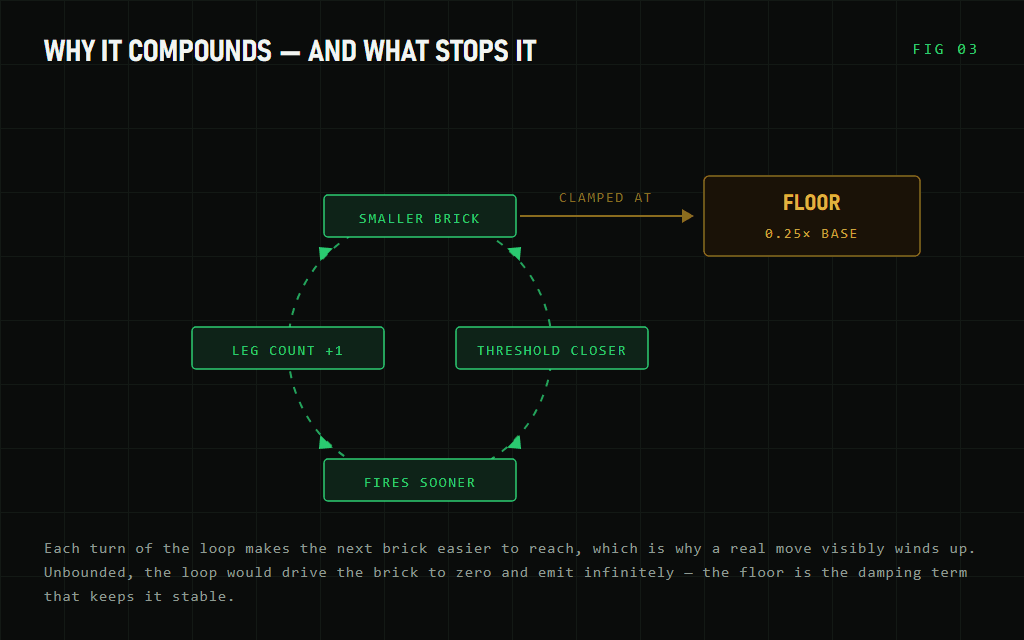
That’s positive feedback, and it’s the whole point rather than a side effect. It’s why a genuine trend doesn’t just tick along at a constant rate on this chart — it visibly winds up. The first few bricks of a move look ordinary. By brick eight you’re getting four of them in the space one used to occupy.
🛑 Why there’s a floor
Unbounded positive feedback goes to zero, and a zero-width brick is a genuine problem: every tick would satisfy it, infinitely. At an 8% step the raw multiplier reaches zero at brick thirteen and goes negative after.
So the shrink is floored at 0.25 of the base. That’s the damping term that makes the system stable, not a number I tuned for feel. On an 80-tick base it puts the floor at 20 ticks, which the run reaches around brick eleven and holds.
One implementation detail worth knowing. The brick is snapped to a whole number of ticks. Scaling a price distance by a fraction gives you widths like 73.6 ticks, and a brick that isn’t a whole number of ticks draws bars that sit off the instrument’s price grid — the chart slowly drifts away from tradeable prices. Snapping costs a little granularity, which is why the base needs to be wide enough for the step to actually move a whole tick.
One more: because each brick depends on the ones before it, the bar rebuilds itself from tick data every time a chart loads rather than reading from NinjaTrader’s bar cache. Charts take a moment longer to populate, and in exchange the bricks are identical every time — no drift at the point where a reloaded chart picks up live ticks. If that distinction is unfamiliar, historical versus real-time processing is worth a read.
⚖️ Reversals get cheap at full extension
This is the part you need to understand before you use it.
Like every Renko, a reversal costs twice a brick. But the brick has been shrinking — so the reversal threshold shrinks with it.
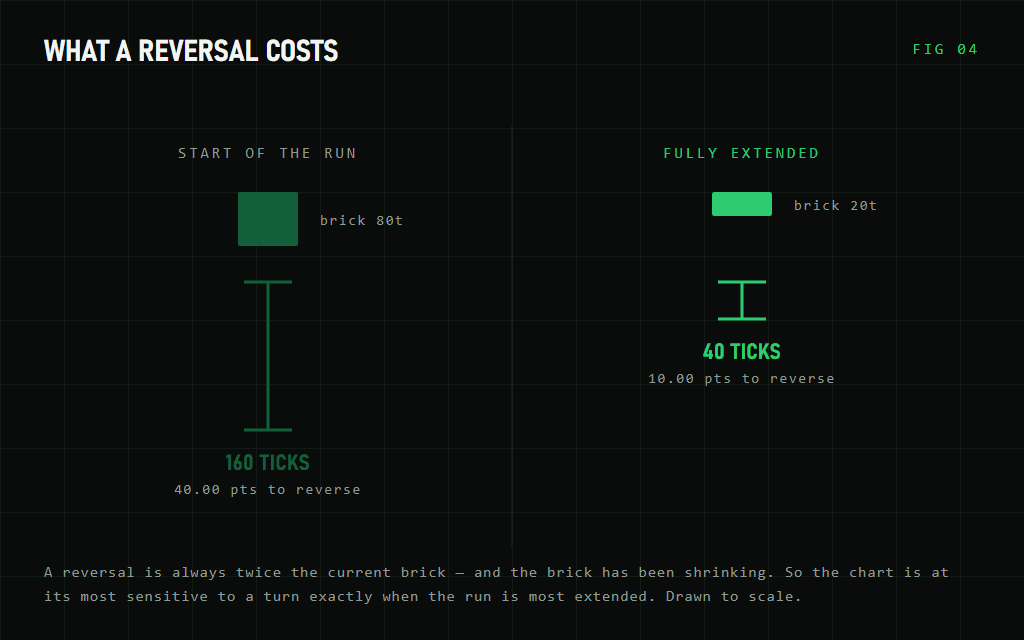
The chart is therefore at its most sensitive to a change of direction at exactly the moment the move is most extended.
You can read that two ways, and both are fair. It catches the turn early, which is arguably what you want at the end of a long run. It also means a mature trend can be flipped by a small amount of noise. Which of those you get depends heavily on your base size — an 80-tick base on NQ leaves a 40-tick reversal at full extension, which is a real move; a base ten times smaller would leave you reversing on noise.
Widen the step and you get a more dramatic effect and reach the floor faster. That’s a real trade, not a free upgrade.
📊 On the chart
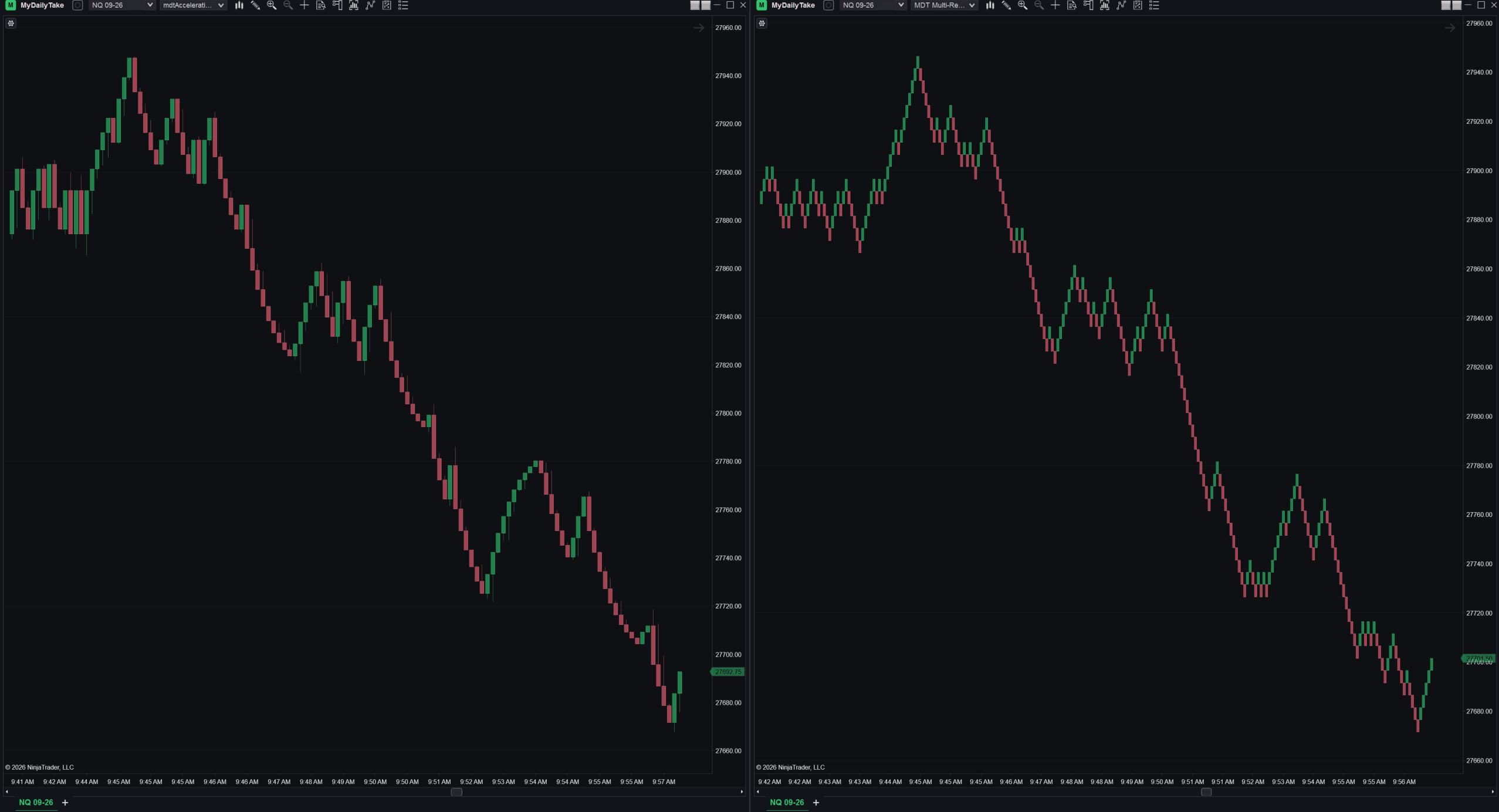
Here it is against a traditional Renko on the same instrument over the same window. Acceleration on the left, a conventional Renko on the right.
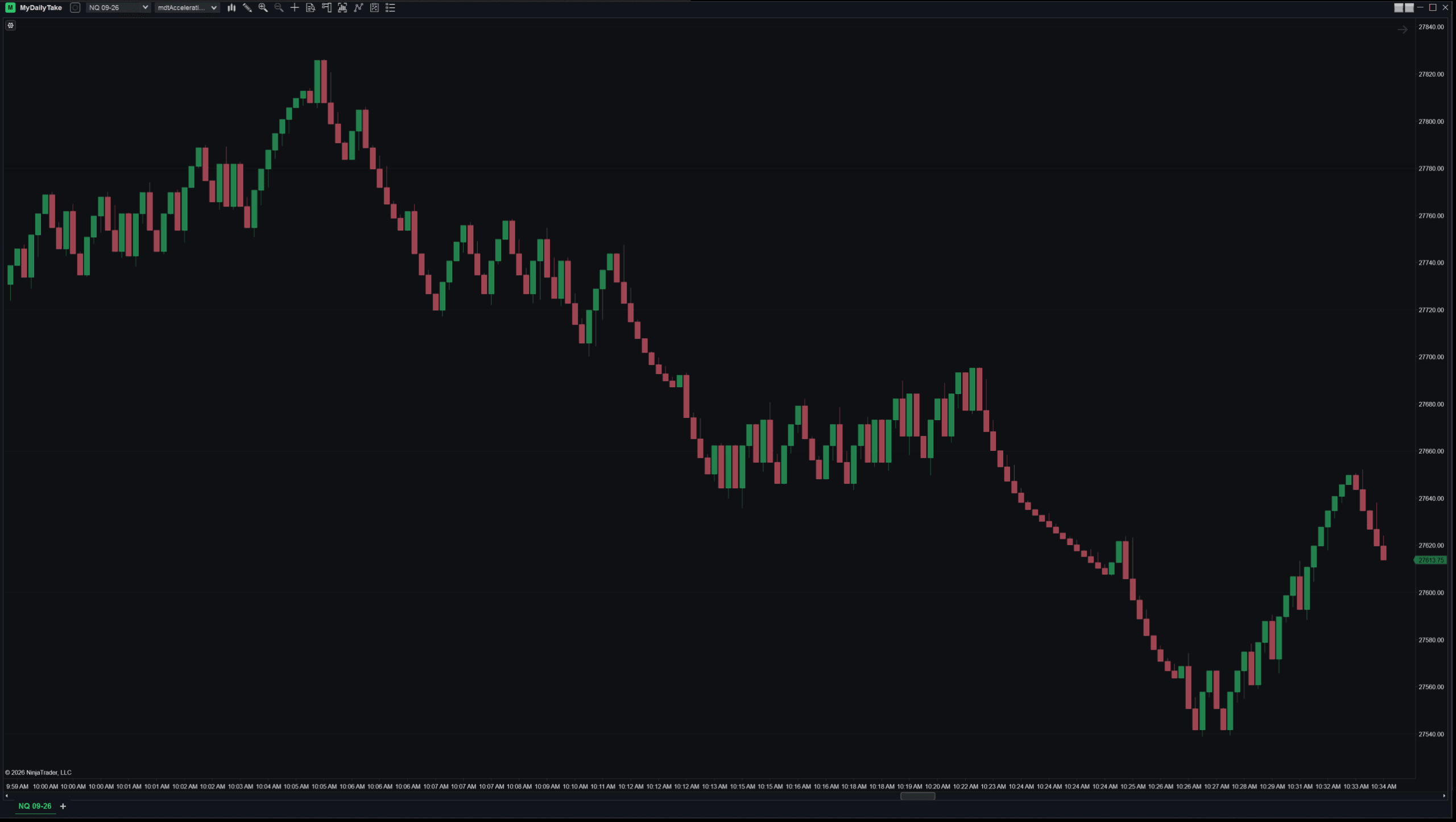
The clearer demonstration is within a single chart, because you can see it react to whether there’s a run at all. Watch the descent on the right-hand side against the sideways stretch just before it.
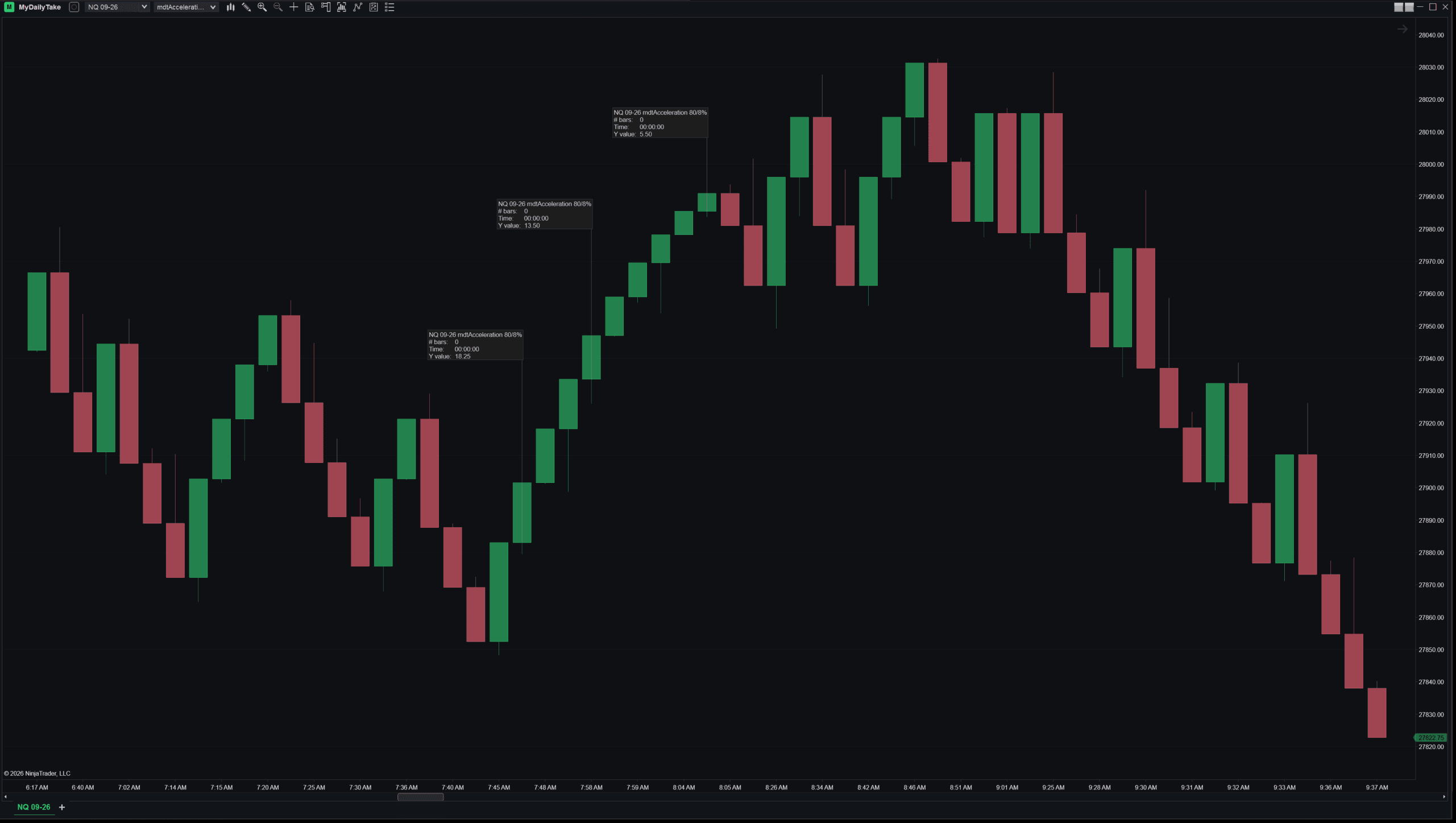
And measured, so it isn’t a matter of squinting. Three consecutive bricks up the same leg:
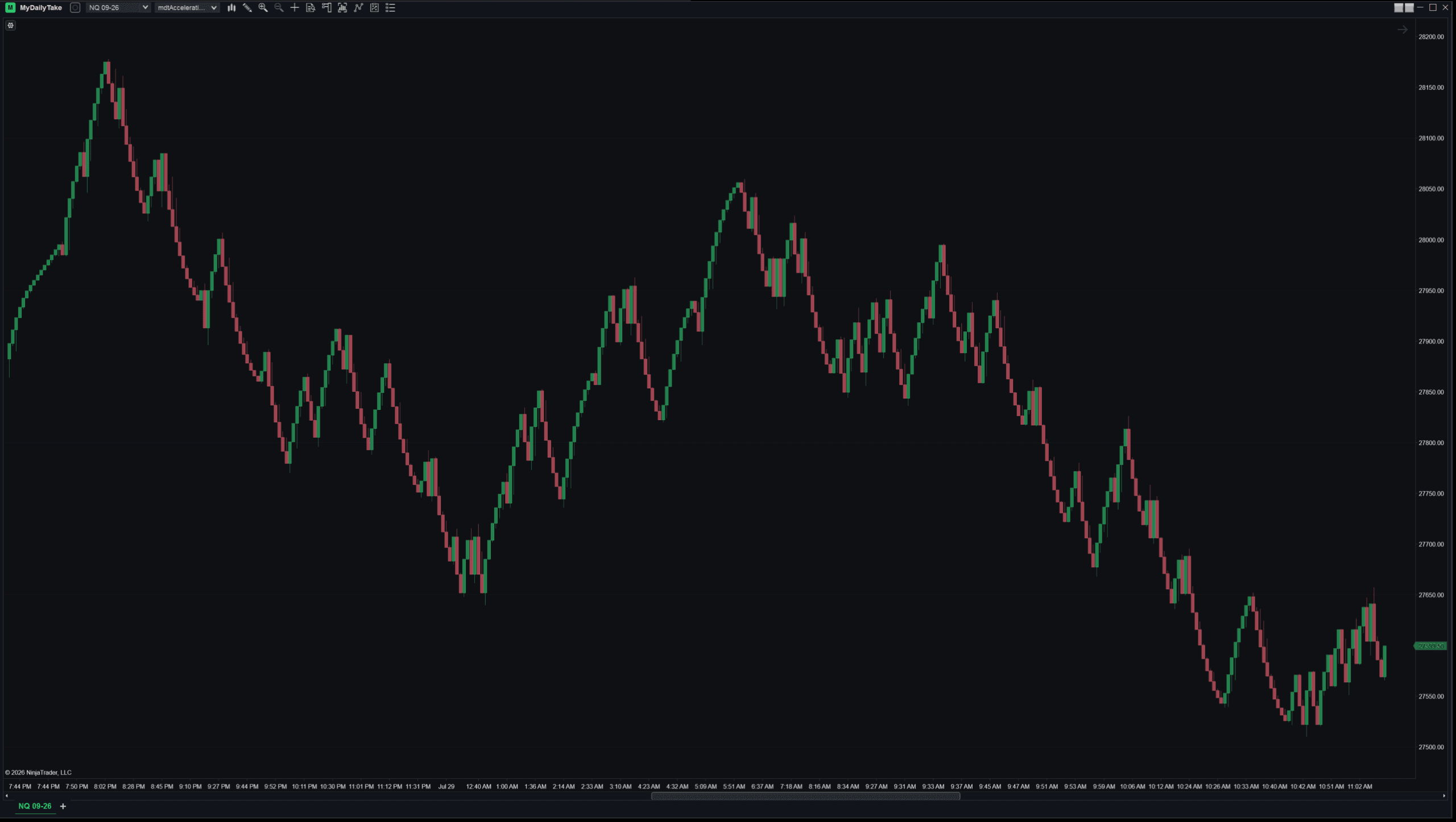
Zoomed out over a couple of sessions, the character holds up: every real leg smooths into a fine staircase, and the quiet stretches stay coarse.
⚙️ Settings
| Setting | What it does |
|---|---|
| Base brick (ticks) | Width of the first brick in a run. Everything scales from this. Size it to the instrument — 80 ticks suits NQ; a market that moves in smaller increments wants far less. |
| Shrink step % | How much narrower each successive brick gets. Clamped to 0–50. Set it to 0 and you get a canonical Renko back, which is a useful way to see exactly what the feature is doing. |
Pick the base first. It needs to be wide enough that the shrink step moves a whole tick, and wide enough that a reversal at full extension is still a move you’d respect.
🛠️ Using it from a strategy
It’s a normal NinjaScript bar type, so a strategy can consume it as a secondary series. Brick height is worth reading in its own right — because it shrinks as a run extends, it doubles as a read on how far the current leg has already travelled.
It’s built from ticks, so your Calculate mode decides whether you see bricks forming or only finished ones. OnBarClose is the sane default for reading completed bricks.
private const int AccelBarsType = 7125;   // mdtAccelerationRenko

protected override void OnStateChange()
{
    if (State == State.SetDefaults)
    {
        Name      = "AccelerationRenkoExample";
        Calculate = Calculate.OnBarClose;
    }
    else if (State == State.Configure)
    {
        // Base brick in ticks, shrink step in percent — the same two numbers
        // you would set in the bar-type dialog. Scale the base to the
        // instrument: 80 ticks suits NQ, far less on a slower market.
        AddDataSeries(new BarsPeriod
        {
            BarsPeriodType = (BarsPeriodType) AccelBarsType,
            Value          = 80,
            Value2         = 8
        });
    }
}

protected override void OnBarUpdate()
{
    // BarsInProgress 1 is the Acceleration Renko series added above.
    if (BarsInProgress != 1) return;
    if (CurrentBars[1] < 2) return;

    // Brick direction. Renko bricks close at their extreme, so comparing the
    // close to the open is enough to know which way this brick printed.
    bool brickUp = Closes[1][0] > Opens[1][0];

    // Brick height in ticks — this is what shrinks as a run extends, so it
    // doubles as a read on how far the current leg has already travelled.
    double brickTicks = Math.Abs(Closes[1][0] - Opens[1][0]) / TickSize;

    Print(Times[1][0] + "  " + (brickUp ? "up" : "down")
        + "  " + brickTicks.ToString("0") + " ticks");
}
📝 One honest note
A bar type is not an edge. It changes what you see, not whether the trade works. Acceleration Renko makes momentum easier to read and it will not tell you whether the momentum is worth trading.
It’s also worth remembering what Renko gives up in general: time disappears, and small counter-moves get compressed out. That’s the trade you already accepted by using Renko at all — this doesn’t change it in either direction.
📦 Download
Free, and there’s no licence key, activation or sign-in — import it and it works.
Install:
- Download both files — the bar type, and MdtBarsCommon, the shared library it’s built on.
- In NinjaTrader 8, go to Tools → Import → NinjaScript Add-On and import each one.
- Restart NinjaTrader once, after both imports — import one, restart, and the bar type won’t appear.
- Open a chart, choose mdtAcceleration from the bar type dropdown, and set your base brick and shrink step.


This is the first of a series on bar types. I have a folder full of them that came out of the same exercise — some worked, some didn’t, and the ones that didn’t are frequently more interesting to explain. More soon.