TradingView Chop and explode (ps5) [capissimo] Conversion to NinjaTrader 8
capissimo’s Chop and explode (ps5) reframes the classic RSI as a regime detector. Instead of reading 70/30 thresholds for overbought/oversold, this version applies RSI to a minimax-scaled source — the price is normalized to a 0-100 range over a window — and uses 60/40 as the BUY/SELL switches. When the scaled RSI sits between 40 and 60 the market is in chop and the prior signal holds; when it breaks above 60 it explodes bullish, below 40 it explodes bearish.
An optional Ehlers high-pass + 6-tap SuperSmoother cleaning filter sits in front of the RSI to reduce noise, and an overlay line draws the active regime in the indicator’s primary or secondary color so you can read the regime at a glance.
This post is the NinjaTrader 8 conversion. The full source compiles standalone in indTradingView/, exposes the RSI value plus the regime signal as Series<> outputs for strategy use, and is yours to download as a NinjaScript Archive.
Original Pine Script: Chop and explode (ps5) by capissimo
License: Mozilla Public License 2.0 (MPL 2.0)
🆚 What Makes Chop and explode Different
Standard RSI on raw price wanders around 50 in trending markets and ping-pongs against 70/30 in choppy ones — the opposite of what you want. capissimo’s twist is to run RSI on a minimax-scaled source: normalize the source to [1, 100] over a rolling window, then RSI that. The output is highly responsive to true regime shifts because the input is already in a bounded, range-aware coordinate system.
Three regimes, not two thresholds. The 40/60 band is wider than RSI’s traditional 30/70, and the middle is read as ‘chop, don’t act.’ Above 60 = BUY regime; below 40 = SELL regime; in between = hold the prior signal. The Signal output is +1 / 0 / −1 reflecting these three states.
Optional Ehlers SuperSmoother pre-filter. Toggling Clean Source on routes the source through a 6-tap SuperSmoother filter (Ehlers’ 2009 design) before the minimax + RSI chain. The filter reduces high-frequency noise without introducing the lag of a typical moving average.
⚙️ Settings
Chop and explode exposes its inputs in three property groups: the calculation parameters (source, cleaning toggle, RSI and minimax windows), the signaling toggle for BUY/SELL labels, and the appearance colors for the bullish and bearish regime lines.
Parameters
| Parameter | Default | Description |
|---|---|---|
| Source | Close | Price source feeding the cleaning filter (if enabled), minimax scaling, and RSI. |
| Clean Source | False | When enabled, route the source through a 6-tap SuperSmoother + high-pass filter (Ehlers 2009) before processing. |
| RSI Lookback | 14 | RSI period applied to the minimax-scaled source. |
| Minimax Window | 30 | Lookback for the minimax (rolling normalization) of the source to [1, 100]. |
Signaling
| Parameter | Default | Description |
|---|---|---|
| Show BUY/SELL Labels | True | Render BUY / SELL text labels at the bar where the regime first changes. |
Appearance
| Parameter | Default | Description |
|---|---|---|
| Bullish Color | Lime | Color of the regime line and the BUY label when the scaled RSI is above 60. |
| Bearish Color | Red | Color of the regime line and the SELL label when the scaled RSI is below 40. |
🧠 How It Works
Each bar runs four chained transforms on the source, then classifies into one of three regimes.
- Optional Ehlers cleaning. If Clean Source is on, route the raw source through a high-pass + 6-tap SuperSmoother filter chain. This reduces high-frequency wiggle without the lag of a moving average.
- Minimax scaling. Compute the highest and lowest values of the (cleaned) source over the Minimax Window. Normalize the current source value to the range [1, 100] using that high/low. The output is a price ‘percentile’ relative to recent range.
- RSI on the scaled source. Apply standard Wilder’s RSI with the RSI Lookback period to the minimax-scaled series. Because the input is already bounded and range-aware, the RSI’s swings track regime shifts cleanly.
- Three-regime classification. If RSI > 60: regime is +1 (BUY). If RSI < 40: regime is −1 (SELL). Otherwise: regime holds its prior value (chop band). This is what 'explode' means — the indicator stays in the prior commit until RSI clears the chop band.
- Plot output. An overlay regime line is drawn in the bullish or bearish color depending on Signal[0]. BUY/SELL text labels fire on the first bar of each new regime if the toggle is on.
The indicator is non-repainting: every regime decision is made on closed-bar data and never updates after the bar confirms.
🛠️ Using It in a Strategy
Chop and explode is built to be a regime gate. Its most natural strategy use is to enter on the StartedLong / StartedShort transitions and exit only when the opposite signal fires — riding through the chop band without flipping.
Below is the lifecycle: instantiate in State.DataLoaded, then in OnBarUpdate react to regime starts.
private ChopAndExplode chop;

protected override void OnStateChange()
{
    if (State == State.SetDefaults)
    {
        Name = "ChopAndExplodeStrategyExample";
    }
    else if (State == State.DataLoaded)
    {
        chop = ChopAndExplode(
            ChopAndExplode_Source.Close,    // Source
            false,                          // Clean Source
            14,                             // RSI Lookback
            30,                             // Minimax Window
            true                            // Show BUY/SELL Labels
        );
    }
}

protected override void OnBarUpdate()
{
    if (CurrentBar < 31) return;

    // Enter on regime starts
    if (chop.StartedLong[0])
        EnterLong();
    if (chop.StartedShort[0])
        EnterShort();

    // Hold through chop. Exit only on the opposite regime start.
    // (The orchestrator-default ExitOnSessionCloseSeconds will handle EOD if you need it.)
}
All outputs are Series<>, so you can index back in time freely. Signal[5] reads the regime five bars ago.
Public Outputs
| Output | Type | Description |
|---|---|---|
| Rsi[0] |
Series | The scaled RSI value (RSI applied to the minimax-normalized source). 0–100. |
| Signal[0] |
Series | Regime signal: +1 bullish (RSI > 60), −1 bearish (RSI < 40), holds prior in 40–60 chop band. |
| StartedLong[0] |
Series | True on the first bar of a new bullish regime. |
| StartedShort[0] |
Series | True on the first bar of a new bearish regime. |
🔄 Conversion Notes
A few things changed in the translation from Pine Script to NinjaScript:
Wilder RSI inlined. Pine’s ta.rsi uses Wilder’s RMA-style smoothing internally; this conversion implements the same recurrence inline so it can be applied to the minimax-scaled custom series rather than to a price input.
Ehlers SuperSmoother + high-pass inlined. The optional cleaning filter is implemented as two persistent state variables for the high-pass plus a 6-tap SuperSmoother recurrence — no external library dependency.
Regime line via two plots with Reset(). Pine renders the regime line in a single conditional color expression. NT8 uses two AddPlot calls (bullish and bearish) and Reset()s whichever one isn’t active each bar, producing a cleanly broken segment line that matches the Pine appearance.
Documented scope drop: Pine’s optional ‘Seasonal Random Index’ overlay is omitted — it’s visual sugar that doesn’t affect the BUY/SELL detection.
Series-based public outputs. Four outputs are exposed: Rsi, Signal, StartedLong, StartedShort. Strategies can read the integer Signal directly or the boolean transitions, depending on whether they want continuous or event-based logic.
Alerts stripped. The two alertcondition calls in the original Pine source are removed — strategy consumers read StartedLong / StartedShort directly via the public Series outputs.
📦 Download
The full source is available as a free NinjaScript Archive. To install:
- Download the
.zipfile below. - In NinjaTrader 8, go to Tools → Import → NinjaScript Add-On.
- Select the downloaded
.zipfile. - The indicator will appear under Indicators → indTradingView → Chop and explode (ps5) [capissimo] on your chart.
📊 Chart Example
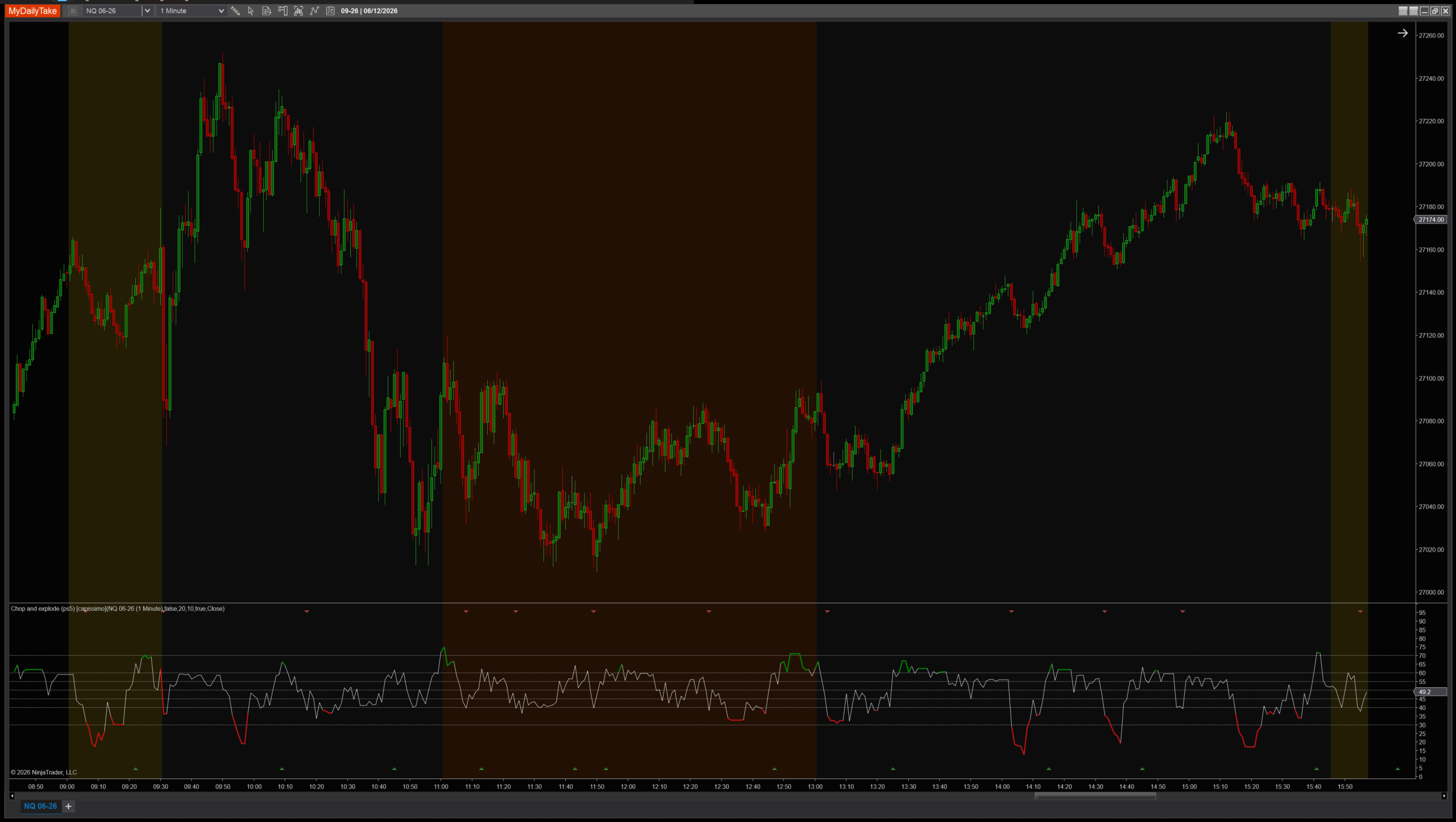
Chop and explode (ps5) on a 1-minute chart with default settings. The lower panel shows the scaled RSI bouncing between the 40 and 60 thresholds, with the overlay regime line in lime when above 60 (BUY) and red when below 40 (SELL). Notice how the regime holds through the 40–60 chop band — the indicator doesn’t flip on every cross, only on commits beyond the bands.


The original Pine Script™ code is by capissimo and is licensed under the Mozilla Public License 2.0 (MPL 2.0). This NinjaTrader 8 adaptation is by MyDailyTake.com. The use of capissimo’s name or adapted code does not imply endorsement by the original author.