TradingView SuperTrend Cluster (Zeiierman) Conversion to NinjaTrader 8
One SuperTrend is a single voice. Zeiierman’s SuperTrend Cluster is a committee — five SuperTrend members, each with their own ATR length, factor, MA-smoothing type, MA length, and weight. The committee votes; the cluster line moves only when consensus crosses the threshold.
The five members can use SMA, EMA, LinReg, WMA, HMA, or RMA smoothing on the HLC3 source — defaults are EMA(3), EMA(5), SMA(8), WMA(13), HMA(21) — so the ensemble naturally spans short-to-long timeframes and different smoothing personalities. The bull and bear shares are exposed; the cluster line itself is the weighted average across the agreeing members; bar coloring is a gradient between Neutral and Bull / Bear by cluster strength.
This post is the NinjaTrader 8 conversion. The full source compiles standalone in indTradingView/, exposes the cluster line, the consensus direction, and the bull / bear shares as Series<> outputs for strategy use, and is yours to download as a NinjaScript Archive.
Original Pine Script: SuperTrend Cluster by Zeiierman
License: Attribution-NonCommercial-ShareAlike 4.0 International (CC BY-NC-SA 4.0)
🆚 What Makes SuperTrend Cluster Different
Standard SuperTrend has a single set of inputs — one ATR length, one multiplier. Tune them well for trending sessions and they whipsaw in chop; tune them well for chop and they lag in trends. The cluster sidesteps this by running five members with different parameter regimes simultaneously — a fast / loose member catches early moves, a slow / tight member confirms only mature trends, the weighted vote balances the two.
Six MA types per member. Each of the five members independently picks SMA, EMA, LinReg, WMA, HMA, or RMA. The default ensemble uses EMA, EMA, SMA, WMA, HMA — a deliberate spread of smoothing personalities so the members aren’t redundant.
Two-gate flip logic. The cluster regime flips only when the weighted consensus share crosses the user-set threshold (default 0.60) AND the user-selected base member also agrees. Two-gate filtering means a single fast member can’t drag the cluster on its own — the consensus has to follow.
Gradient bar coloring by cluster strength. Each bar’s color interpolates between Neutral and Bull (or Bear) by how strong the consensus is. A 0.65 bull share is faintly green; a 0.95 bull share is a saturated bull color. The strength is on the bars themselves, no extra panel needed.
⚙️ Settings
SuperTrend Cluster exposes its inputs across eight property groups: the cluster engine (consensus + base index), the visual analytics (bar coloring + labels + colors), the cloud fill (SharpDX trapezoid between cluster line and HLC3 SMA), and one group per SuperTrend member with its own ATR length, factor, MA type, MA length, and weight.
Cluster Engine
| Parameter | Default | Description |
|---|---|---|
| Consensus Threshold | 0.60 | Minimum weighted bull / bear share required to register the regime. |
| Base SuperTrend Index | 3 | Which of the five members drives flip markers and aligns the final direction (1–5). |
Visual Analytics
| Parameter | Default | Description |
|---|---|---|
| Dynamic Bar Coloring | True | Recolor bars by cluster-strength gradient (Neutral ↔ Bull / Bear). |
| Show Cluster Labels | True | Render Bull Cluster / Bear Cluster labels at the base ST flip bar. |
| Show Base ST Flip Dots | True | Render dots at the base ST line on flip bars. |
| Bull Color | Lime | Bullish color for the cluster line, gradient bars, and cloud fill. |
| Bear Color | #F7525F | Bearish color for the cluster line, gradient bars, and cloud fill. |
| Neutral Color | #FF9800 | Mid-gradient color used when the consensus is weak. |
Cloud Fill
| Parameter | Default | Description |
|---|---|---|
| Show Cloud Fill | True | Render the translucent cloud between the active cluster line and SMA(HLC3, ref). |
| Cloud Reference Length | 8 | SMA length on HLC3 used as the cloud's other edge. |
| Cloud Transparency | 65 | 0 = solid, 95 = nearly invisible (Pine semantics). |
SuperTrend Members 1–5 (defaults)
| Member | ATR Length | Factor | MA Type | MA Length | Weight |
|---|---|---|---|---|---|
| 1 | 7 | 1.5 | EMA | 3 | 1.0 |
| 2 | 10 | 2.0 | EMA | 5 | 1.0 |
| 3 | 14 | 2.5 | SMA | 8 | 1.2 |
| 4 | 21 | 3.0 | WMA | 13 | 1.4 |
| 5 | 34 | 4.0 | HMA | 21 | 1.6 |
🧠 How It Works
Each bar runs the five members in parallel, computes the weighted consensus, and only commits a flip when both gates clear.
- Per-member smoothing. For each of the five members, smooth HLC3 with the chosen MA type (SMA / EMA / LinReg / WMA / HMA / RMA) over the member’s MA Length. This is the source the SuperTrend math is run on.
- Per-member SuperTrend. Compute MA ± Factor × ATR(ATR Length). Apply standard band-locking (upper band ratchets only down in a downtrend, lower only up in an uptrend). Each member tracks its own direction state.
- Weighted consensus. Sum the bull-direction members’ weights / total weight = bull share. Symmetric for bear share. Both shares are exposed as
Series<double>. - Two-gate flip. The cluster regime flips up when bull share ≥ ConsensusThreshold AND the base ST member agrees (its direction is up). Symmetric for the down flip. So a single fast member can’t drag the cluster — the consensus has to follow.
- Cluster line. Weighted average of the agreeing members’ SuperTrend values — bull-side values when in an uptrend, bear-side when in a downtrend. The result is a single trend line that’s the committee’s compromise.
- Gradient bar coloring. Each bar’s color interpolates between Neutral and Bull (or Bear) by the active share. A 0.65 share is faint; a 0.95 share is saturated.
BarBrushesdrives this directly — no panel needed. - Cloud fill + flip markers. SharpDX trapezoid between the cluster line and SMA(HLC3, CloudReferenceLength) in the trend tone with user-controlled opacity. Triangle markers + Bull Cluster % / Bear Cluster % labels at base ST flip bars; small flip dots on the base ST line.
The indicator is non-repainting: every member SuperTrend uses the standard band-lock pattern, and the consensus / cluster line are computed once on closed-bar data.
🛠️ Using It in a Strategy
SuperTrend Cluster’s most natural strategy use is to enter on Direction flips and trail along the ClusterLine — the consensus filter eliminates many of the false flips that plague single-member SuperTrends, and the cluster line is a smoothed trail level.
Below is the lifecycle: instantiate in State.DataLoaded, then in OnBarUpdate watch for Direction flips and trail along the cluster line.
private SuperTrendCluster stc;

protected override void OnStateChange()
{
    if (State == State.SetDefaults)
    {
        Name = "SuperTrendClusterStrategyExample";
    }
    else if (State == State.DataLoaded)
    {
        stc = SuperTrendCluster(
            0.60,           // Consensus Threshold
            3,              // Base SuperTrend Index
            true,           // Dynamic Bar Coloring
            true,           // Show Cluster Labels
            true,           // Show Base ST Flip Dots
            true,           // Show Cloud Fill
            8,              // Cloud Reference Length
            65,             // Cloud Transparency
            // Member 1
            7,  1.5, SuperTrendCluster_MAType.EMA,  3,  1.0,
            // Member 2
            10, 2.0, SuperTrendCluster_MAType.EMA,  5,  1.0,
            // Member 3
            14, 2.5, SuperTrendCluster_MAType.SMA,  8,  1.2,
            // Member 4
            21, 3.0, SuperTrendCluster_MAType.WMA,  13, 1.4,
            // Member 5
            34, 4.0, SuperTrendCluster_MAType.HMA,  21, 1.6
        );
    }
}

protected override void OnBarUpdate()
{
    if (CurrentBar < 50) return;

    bool flippedUp   = stc.Direction[0] ==  1 && stc.Direction[1] != 1;
    bool flippedDown = stc.Direction[0] == -1 && stc.Direction[1] != -1;

    if (flippedUp)
    {
        EnterLong();
        SetStopLoss(CalculationMode.Price, stc.ClusterLine[0]);
    }
    if (flippedDown)
    {
        EnterShort();
        SetStopLoss(CalculationMode.Price, stc.ClusterLine[0]);
    }

    // Trail the stop along the cluster line every bar
    if (Position.MarketPosition == MarketPosition.Long)
        SetStopLoss(CalculationMode.Price, stc.ClusterLine[0]);
    else if (Position.MarketPosition == MarketPosition.Short)
        SetStopLoss(CalculationMode.Price, stc.ClusterLine[0]);
}
All four outputs are Series<>, so stc.BullShare[0] can be read every bar to throttle position size by consensus strength if you want a graded sizing rule.
Public Outputs
| Output | Type | Description |
|---|---|---|
| ClusterLine[0] |
Series | Weighted-average SuperTrend across the agreeing members. |
| Direction[0] |
Series | Final cluster direction: 1 in an uptrend, −1 in a downtrend, 0 before the first valid consensus. |
| BullShare[0] |
Series | Weighted bull share in [0..1] across the five members. |
| BearShare[0] |
Series | Weighted bear share in [0..1] across the five members. |
🔄 Conversion Notes
A few things changed in the translation from Pine Script to NinjaScript:
Six MA types as a typed enum. Pine’s string-input switch becomes SuperTrendCluster_MAType with SMA / EMA / LinReg / WMA / HMA / RMA. RMA isn’t a NT8 primitive, so it’s implemented inline as a per-member persistent Series<double> with the standard recurrence.
Per-member SuperTrend implemented inline. Five independent SuperTrend recurrences (upper band, lower band, direction, ST line) are maintained as Series<double>[5] and Series<int>[5], so the cluster math has direct access to every member’s state.
SharpDX cloud fill via PathGeometry. Pine’s fill() between the cluster line and the HLC3 SMA becomes per-bar SharpDX trapezoids in the trend-side color. Opacity is computed as (100 − Transparency) / 100 so the property reads as ‘transparency’ (Pine semantics).
Gradient bar coloring. A linear interpolation between Neutral and Bull / Bear is sampled by the active share each bar. BarBrushes[0] + CandleOutlineBrushes[0] take the sampled brush directly — strength shows on the bars themselves with no extra overlay.
Flip labels and dots via Draw.Text + Draw.Dot. Pine’s label.new and plotshape become Draw.Text with explicit SimpleFont + foreground brush and Draw.Dot at the base ST line on flip bars.
Series-based public outputs. ClusterLine, Direction, BullShare, and BearShare are all exposed as Series<> for strategy consumers. A graded-sizing strategy can read BullShare[0] directly to scale position size by consensus strength.
📦 Download
The full source is available as a free NinjaScript Archive. To install:
- Download the
.zipfile below. - In NinjaTrader 8, go to Tools → Import → NinjaScript Add-On.
- Select the downloaded
.zipfile. - The indicator will appear under Indicators → indTradingView → SuperTrend Cluster [Zeiierman] on your chart.
📊 Chart Example
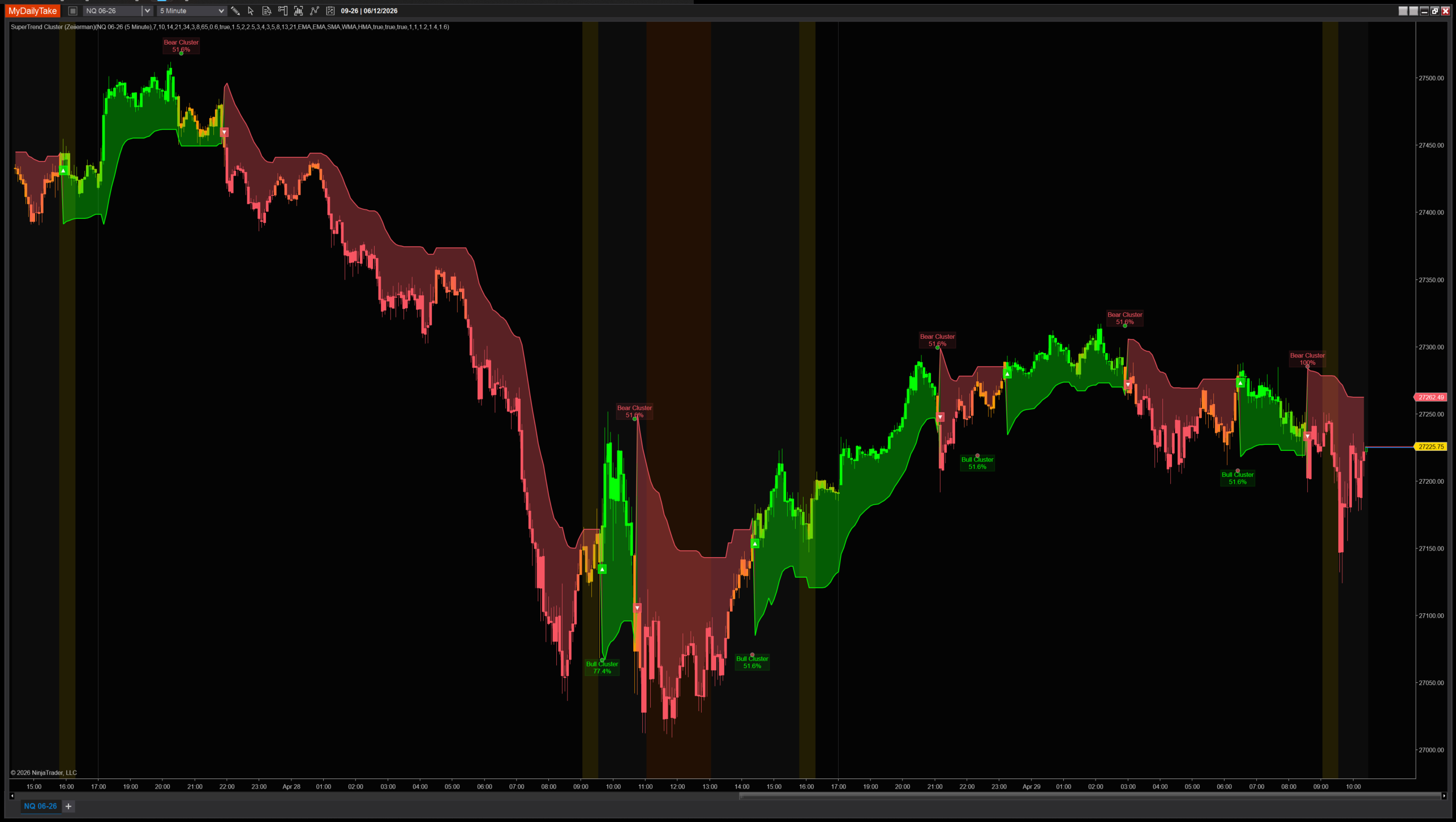
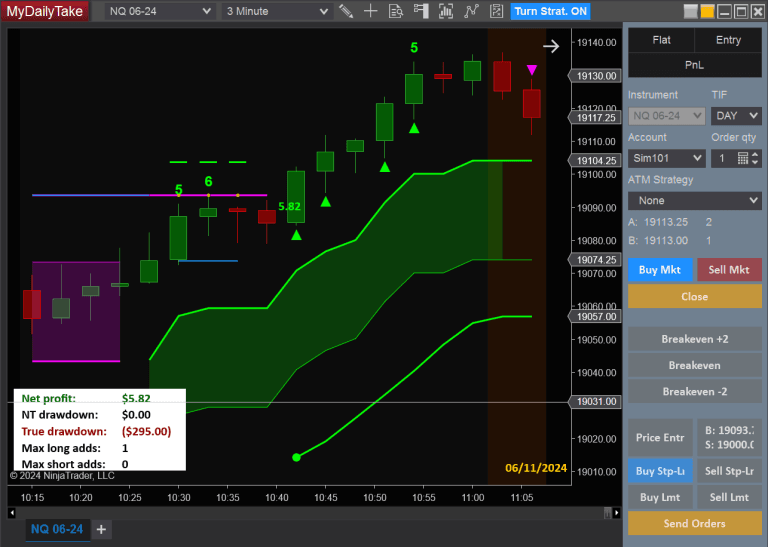
SuperTrend Cluster on a 1-minute chart with default settings. Five SuperTrend members vote; the cluster line is the weighted average of the agreeing side. Bars are colored by consensus strength — faint when shares hover near the threshold, saturated when the cluster strongly agrees. The translucent SharpDX cloud sits between the cluster line and SMA(HLC3, 8), and Bull Cluster % / Bear Cluster % labels mark base-ST flip bars.


The original Pine Script™ code is by Zeiierman and is licensed under the Attribution-NonCommercial-ShareAlike 4.0 International (CC BY-NC-SA 4.0). This NinjaTrader 8 adaptation is by MyDailyTake.com. The use of Zeiierman’s name or adapted code does not imply endorsement by the original author.